Introduction
Amazon PPC (Pay-Per-Click) advertising is essential for Amazon success. But most sellers waste money on unprofitable campaigns because they don’t understand how to properly manage Amazon PPC.
The difference between profitable and unprofitable Amazon PPC campaigns comes down to one thing: strategic management. Understanding ACoS, keyword optimization, bid management, and campaign structure can transform your advertising from a money drain into a profit driver.
In this comprehensive guide, we’ll teach you everything you need to know about Amazon PPC management. You’ll learn proven strategies to lower ACoS, maximize ROI, and scale profitable campaigns that drive real sales growth.
What is Amazon PPC?
Amazon PPC (Pay-Per-Click) is Amazon’s advertising platform that allows sellers to promote products at the top of search results and on product detail pages. You only pay when someone clicks your ad.
Types of Amazon Ads:
1. Sponsored Products
- Most common – Individual product ads
- Appear in: Search results, product pages
- Best for: Direct product promotion
- Control: Keywords, bids, targeting
2. Sponsored Brands
- Brand-focused – Showcase multiple products
- Appear in: Top of search, brand store
- Best for: Brand awareness and store traffic
- Control: Brand keywords, product selection
3. Sponsored Display
- Retargeting – Show ads to previous visitors
- Appear in: Product pages, off-Amazon sites
- Best for: Retargeting and remarketing
- Control: Audience targeting, product targeting
Why Amazon PPC Management Matters
The Challenge:
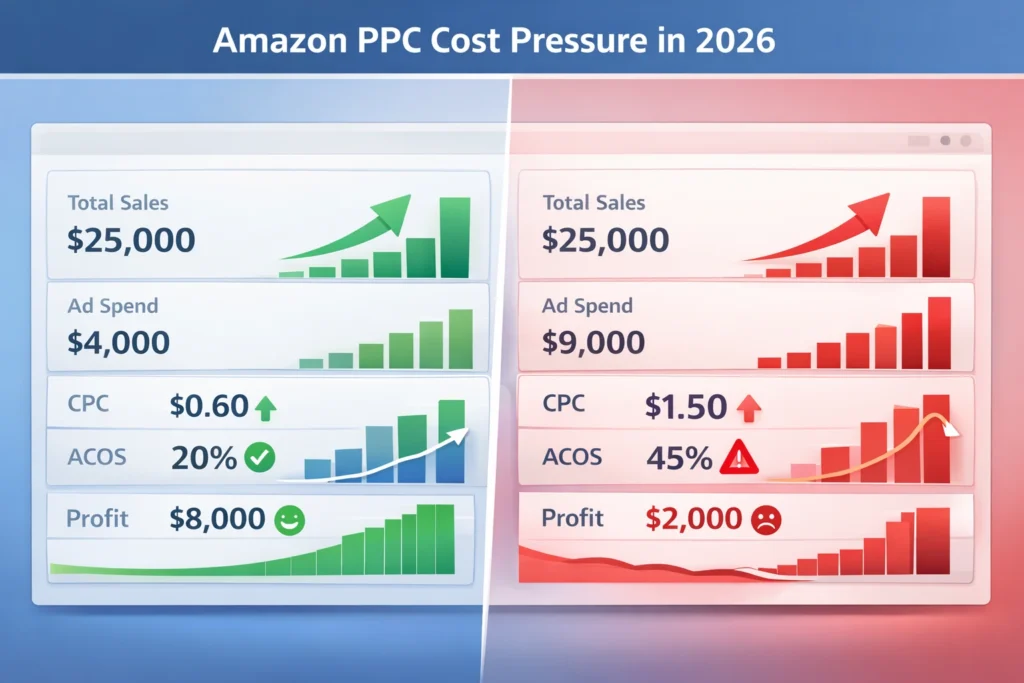
- Average ACoS: 25-35% (many sellers see 40%+)
- Wasted ad spend: Up to 50% on non-converting keywords
- Poor campaign structure: Leads to inefficient spending
- Lack of optimization: Set it and forget it = money down the drain
The Opportunity:
- Profitable ACoS: 15-25% achievable with proper management
- ROI potential: 3-5x return on ad spend
- Organic boost: PPC can improve organic rankings
- Scalable growth: Profitable campaigns can scale infinitely
Understanding ACoS (Advertising Cost of Sale)
What is ACoS?
ACoS = (Ad Spend ÷ Ad Sales) × 100
Example:
- Ad Spend: $100
- Ad Sales: $500
- ACoS: ($100 ÷ $500) × 100 = 20%
What is a Good ACoS?
It depends on your profit margin:
| Product Margin | Target ACoS | Healthy Range |
|---|---|---|
| 50%+ | 25-35% | 20-40% |
| 30-50% | 20-30% | 15-35% |
| 20-30% | 15-25% | 10-30% |
| Under 20% | 10-20% | 5-25% |
General Rule: Target ACoS should be 10-15% below your profit margin to ensure profitability.
ACoS vs ROAS:
ACoS (Advertising Cost of Sale):
- Lower is better
- Shows cost as % of sales
- Example: 20% ACoS = $0.20 cost per $1 sale
ROAS (Return on Ad Spend):
- Higher is better
- Shows revenue per $1 spent
- Example: 5x ROAS = $5 revenue per $1 spent
- Formula: ROAS = 1 ÷ (ACoS ÷ 100)
Amazon PPC Campaign Structure
Campaign Types:
1. Automatic Campaigns
- Purpose: Keyword discovery
- How it works: Amazon targets based on your listing
- Best for: New products, finding keywords
- Control: Limited (just budget and bid)
2. Manual Campaigns
- Purpose: Precise keyword targeting
- How it works: You choose exact keywords
- Best for: Scaling profitable keywords
- Control: Full (keywords, bids, match types)
Match Types:
Broad Match
- Reach: Widest (includes variations)
- Control: Least precise
- Use for: Discovery, high-volume terms
- Example: “headphones” matches “wireless headphones”, “bluetooth headphones”
Phrase Match
- Reach: Moderate (must include phrase)
- Control: More precise
- Use for: Balanced reach and control
- Example: “wireless headphones” matches “best wireless headphones” but not “headphones wireless”
Exact Match
- Reach: Narrowest (exact term only)
- Control: Most precise
- Use for: High-intent, converting keywords
- Example: “wireless headphones” only matches exact search
Amazon PPC Management Strategy
Phase 1: Discovery (Weeks 1-2)
Goal: Find profitable keywords
Actions:
- Start with Automatic Campaigns
- Budget: 10-15% of target revenue
- Let Amazon find keywords
- Run for 1-2 weeks
- Analyze Performance
- Identify converting keywords
- Find high-ACoS keywords to pause
- Extract search terms report
- Harvest Winners
- Move profitable keywords to Manual campaigns
- Start with Exact Match
- Set bids based on Automatic performance
Phase 2: Optimization (Weeks 3-4)
Goal: Lower ACoS and improve efficiency
Actions:
- Negative Keywords
- Add non-converting search terms
- Exclude irrelevant searches
- Reduce wasted spend
- Bid Optimization
- Lower bids on high-ACoS keywords
- Raise bids on low-ACoS keywords
- Use bid adjustments strategically
- Keyword Refinement
- Pause unprofitable keywords
- Scale profitable keywords
- Test new keyword variations
Phase 3: Scaling (Weeks 5+)
Goal: Grow profitable campaigns
Actions:
- Increase Budgets
- Scale winning campaigns
- Expand to new keywords
- Test new match types
- Campaign Expansion
- Add related keywords
- Test new products
- Explore new match types
- Advanced Strategies
- Product targeting
- Competitor targeting
- Seasonal optimization
Amazon PPC Best Practices
1. Start with Automatic Campaigns
Why:
- Amazon finds keywords you’d never think of
- Discovers long-tail opportunities
- Identifies converting search terms
- Low effort, high value
How:
- Set reasonable budget
- Let run for 1-2 weeks
- Extract search terms report
- Harvest winners to Manual
2. Use Negative Keywords Strategically
Purpose: Exclude irrelevant searches
How to Find:
- Search Terms Report
- High impressions, zero sales
- High ACoS keywords
- Irrelevant search terms
Example:
- Selling “wireless headphones”
- Negative: “cheap”, “free”, “used”, “repair”
3. Optimize Bids Based on Performance
Bid Strategy:
- High ACoS keywords: Lower bids or pause
- Low ACoS keywords: Raise bids to get more traffic
- Break-even keywords: Test bid adjustments
- New keywords: Start conservative, adjust up
Bid Adjustment Formula:
- If ACoS is 40% and target is 25%: Lower bid by 30-40%
- If ACoS is 15% and target is 25%: Raise bid by 20-30%
4. Structure Campaigns by Goal
Campaign Organization:
- Brand Campaign: Your brand name keywords
- Competitor Campaign: Competitor brand keywords
- Generic Campaign: Product category keywords
- Long-tail Campaign: Specific, low-competition terms
Benefits:
- Easier management
- Better performance tracking
- Clearer optimization
- Scalable structure
5. Monitor and Adjust Daily
Daily Tasks:
- Check campaign performance
- Review search terms report
- Add negative keywords
- Adjust bids
- Pause unprofitable keywords
Weekly Tasks:
- Analyze overall performance
- Review ACoS trends
- Plan optimizations
- Test new strategies
6. Use Product Targeting
Beyond Keywords:
- Target competitor ASINs
- Target complementary products
- Target category pages
- Lower competition, higher conversion
7. Optimize for Mobile
Mobile Considerations:
- 70%+ of Amazon traffic is mobile
- Mobile users convert differently
- Test mobile-specific bids
- Optimize for mobile experience
Lowering ACoS: Proven Strategies
Strategy 1: Negative Keyword Optimization
Impact: Can reduce ACoS by 10-20%
How:
- Export Search Terms Report weekly
- Identify high-impression, zero-sale terms
- Add as negative keywords
- Monitor impact on ACoS
Example:
- Search term: “headphones repair” (100 impressions, 0 sales)
- Add “repair” as negative keyword
- Save wasted spend on irrelevant clicks
Strategy 2: Bid Management
Impact: Can improve ACoS by 15-25%
Bid Optimization:
- High performers: Raise bids 10-20% to get more traffic
- Low performers: Lower bids 20-30% or pause
- New keywords: Start 20% below average bid
- Test adjustments: Small changes, measure impact
Strategy 3: Keyword Harvesting
Impact: Can improve efficiency by 20-30%
Process:
- Run Automatic campaigns
- Extract Search Terms Report
- Identify converting keywords
- Move to Manual Exact Match
- Set bids based on performance
- Scale profitable keywords
Strategy 4: Match Type Strategy
Impact: Better control = lower ACoS
Approach:
- Broad Match: Discovery, high volume
- Phrase Match: Balanced reach/control
- Exact Match: High-intent, converting
Strategy:
- Start with Exact Match for control
- Use Broad for discovery
- Use Phrase for balance
- Optimize based on performance
Strategy 5: Campaign Segmentation
Impact: Better management = better results
Structure:
- Separate campaigns by goal
- Different budgets per campaign
- Easier optimization
- Clearer performance tracking
Amazon PPC Management Tools
Free Tools:
- Amazon Seller Central – Built-in PPC dashboard
- Amazon Brand Analytics – Search term insights (Brand Registry)
Paid Tools (Worth It):
Helium 10 – Adtomic
- Best for: Comprehensive PPC management
- Features: Keyword research, bid optimization, automation
- Cost: $97-397/month
- Why: Saves hours, improves performance
Sellics (now Perpetua)
- Best for: Automated bid management
- Features: AI-powered optimization, automation
- Cost: $99-499/month
- Why: Set it and optimize automatically
Jungle Scout – Ad Manager
- Best for: Keyword tracking and optimization
- Features: Keyword research, performance tracking
- Cost: $49-129/month
- Why: User-friendly, effective
Common Amazon PPC Mistakes
1. Set It and Forget It
❌ Mistake: Create campaigns and never optimize ✅ Solution: Daily monitoring and weekly optimization
2. Ignoring Negative Keywords
❌ Mistake: Wasting money on irrelevant clicks ✅ Solution: Weekly negative keyword review
3. Bidding Too High
❌ Mistake: Max bids on all keywords ✅ Solution: Start conservative, adjust based on performance
4. Not Using Automatic Campaigns
❌ Mistake: Only Manual campaigns from start ✅ Solution: Start Automatic to discover keywords
5. Poor Campaign Structure
❌ Mistake: All keywords in one campaign ✅ Solution: Organize by goal and match type
6. Ignoring Search Terms Report
❌ Mistake: Not reviewing actual search terms ✅ Solution: Weekly analysis and optimization
7. Not Testing
❌ Mistake: Same strategy forever ✅ Solution: Continuous testing and optimization
Measuring PPC Success
Key Metrics:
- ACoS (Advertising Cost of Sale)
- Primary profitability metric
- Target: 10-15% below profit margin
- Monitor daily
- ROAS (Return on Ad Spend)
- Revenue per $1 spent
- Target: 3-5x minimum
- Higher = better
- Impressions
- How many times ad shown
- Indicates visibility
- More = better reach
- Click-Through Rate (CTR)
- Clicks ÷ Impressions
- Target: 0.5-1%+
- Higher = better ad relevance
- Conversion Rate
- Sales ÷ Clicks
- Target: 10-15%+
- Higher = better listing quality
- Total Sales
- Revenue from ads
- Track growth over time
- Scale profitable campaigns
Amazon PPC Management Checklist
Campaign Setup
Ongoing Management
Optimization
Conclusion: Master Amazon PPC Management
Amazon PPC management is the difference between profitable advertising and wasted ad spend. With proper strategy, optimization, and ongoing management, you can achieve profitable ACoS and scale campaigns that drive real growth.
Key Principles:
- Start with Automatic – Discover keywords first
- Optimize continuously – Daily monitoring, weekly optimization
- Use negative keywords – Reduce wasted spend
- Manage bids strategically – Based on performance data
- Structure campaigns well – Easier management and optimization
Remember: Amazon PPC is a tool for growth, not a cost center. When managed properly, it drives sales, improves organic rankings, and scales your business profitably.
Need Professional Amazon PPC Management?
Our Amazon PPC management service handles everything from campaign setup to ongoing optimization. We’ll help you achieve profitable ACoS, maximize ROI, and scale campaigns that drive sustainable growth.
Related Resources
- → Amazon PPC Basics: Simple Guide for Beginners
- → 7 Amazon Sponsored Products Strategies That Lower ACoS by 40%
- → Amazon Listing Optimization: 15 Ways to Improve Your Product Listings
- → Complete Guide to Amazon SEO: How to Rank Your Products on Page 1 in 2025
- → Amazon A+ Content: How to Create Conversion-Optimized Enhanced Brand Content
- → Amazon Keyword Research: The Ultimate Guide to Finding Profitable Keywords