 Advertpreneur
Amazon Automatic vs Manual PPC Campaigns: Which Should You Use?
Introduction One of the most common questions Amazon sellers ask is: "Should I use Automatic or Manual PPC campaigns?" The answer isn't simple—both campaign types serve different purposes and work…
 WordPressCMS
 WooCommerceCommerce
 ShopifyCommerce
 Custom ThemesDesign
 ExtensionsFunctionality
 PortalsSystems
Introduction One of the most common questions Amazon sellers ask is: "Should I use Automatic or Manual PPC campaigns?" The answer isn't simple—both campaign types serve different purposes and work…
One of the most common questions Amazon sellers ask is: “Should I use Automatic or Manual PPC campaigns?”
The answer isn’t simple—both campaign types serve different purposes and work best when used together strategically. Understanding when and how to use each type is crucial for Amazon PPC success.
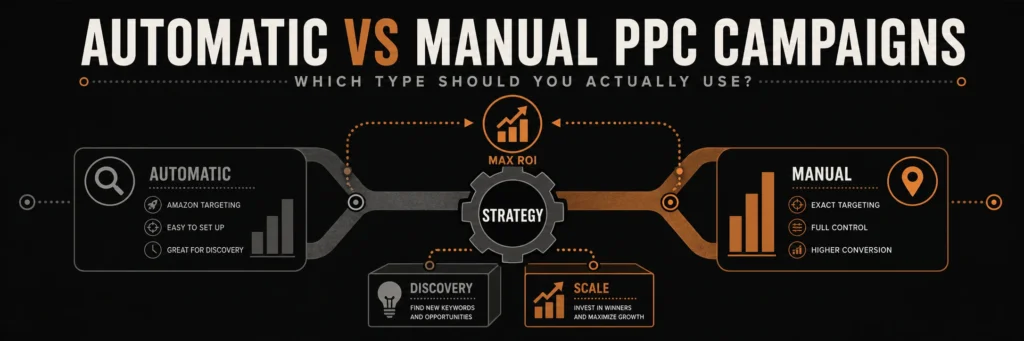
The truth: Most successful Amazon sellers use both Automatic and Manual campaigns in a coordinated strategy. Automatic campaigns discover keywords, while Manual campaigns scale profitable ones.
In this comprehensive guide, we’ll break down Automatic vs Manual campaigns, show you when to use each, and teach you how to create a winning campaign strategy that maximizes ROI.
What Are Amazon Automatic Campaigns?
How automatic targeting works
Amazon Automatic campaigns let Amazon’s algorithm automatically target your ads based on your product listing. You don’t choose keywords—Amazon does it for you.
How Automatic Campaigns Work:
- Amazon analyzes your listing:
- Product title
- Bullet points
- Product description
- Backend keywords
- Product category
- Amazon matches to searches:
- Related customer searches
- Similar product searches
- Category-based matching
- Algorithm-driven targeting
- You control:
- Daily budget
- Default bid
- Campaign name
- That’s it!
Automatic Campaign Features:
- No keyword management – Amazon handles targeting
- Broad reach – Targets many search variations
- Easy setup – Just set budget and bid
- Discovery focused – Finds keywords you’d never think of
- Low maintenance – Minimal ongoing management
What Are Amazon Manual Campaigns?
How manual targeting works
Amazon Manual campaigns give you complete control. You choose exact keywords, set individual bids, and control match types.
How Manual Campaigns Work:
- You choose keywords:
- Specific search terms
- Based on research
- From Automatic campaigns
- Competitor analysis
- You set bids:
- Per keyword bids
- Bid adjustments
- Match type control
- Precise targeting
- You control everything:
- Which keywords to target
- How much to bid
- Match type (Broad, Phrase, Exact)
- Negative keywords
Manual Campaign Features:
- Full control – Choose every keyword
- Precise targeting – Exact search terms
- Bid optimization – Per-keyword bids
- Match type control – Broad, Phrase, Exact
- Higher maintenance – Requires ongoing optimization
Automatic vs Manual: Key Differences
Control Level:
| Aspect | Automatic | Manual |
|---|---|---|
| Keyword Selection | Amazon chooses | You choose |
| Bid Control | One default bid | Per-keyword bids |
| Match Types | Not applicable | Broad/Phrase/Exact |
| Negative Keywords | Limited | Full control |
| Optimization | Minimal | Extensive |
Use Cases:
| Scenario | Automatic | Manual |
|---|---|---|
| New Product | ✓ Best | ✗ Limited data |
| Keyword Discovery | ✓ Excellent | ✗ Need keywords first |
| Scaling Winners | ✗ Less control | ✓ Best |
| Precise Targeting | ✗ Broad reach | ✓ Best |
| Low Maintenance | ✓ Set and go | ✗ Requires work |
Performance Characteristics:
| Metric | Automatic | Manual |
|---|---|---|
| Reach | Wider | Narrower |
| Precision | Lower | Higher |
| ACoS | Often higher | Often lower |
| Volume | Can be high | More controlled |
| Efficiency | Lower | Higher |
When to Use Automatic Campaigns
Where automatic targeting is useful
1. New Products
Why:
- No keyword data yet
- Amazon finds relevant searches
- Discovers long-tail opportunities
- Low effort, high value
Strategy:
- Start with Automatic
- Run for 1-2 weeks
- Extract search terms
- Move winners to Manual
2. Keyword Discovery
Why:
- Finds keywords you’d never think of
- Discovers search variations
- Identifies long-tail opportunities
- Reveals customer language
Strategy:
- Run Automatic continuously
- Weekly search terms review
- Harvest converting terms
- Add to Manual campaigns
3. Low Competition Niches
Why:
- Less need for precise control
- Amazon’s algorithm works well
- Lower maintenance required
- Good for testing
Strategy:
- Use Automatic as primary
- Monitor performance
- Optimize bids
- Add Manual for top keywords
4. Limited Time/Resources
Why:
- Minimal setup required
- Low maintenance
- Amazon handles optimization
- Good starting point
Strategy:
- Start with Automatic
- Learn from data
- Gradually add Manual
- Scale what works
When to Use Manual Campaigns
Where manual targeting is useful
1. Scaling Profitable Keywords
Why:
- Precise bid control
- Better ACoS management
- Optimize per keyword
- Maximum efficiency
Strategy:
- Move winners from Automatic
- Set optimal bids
- Use Exact Match
- Scale budget
2. High Competition Keywords
Why:
- Need precise control
- Competitive bidding required
- Strategic bid management
- Better ROI potential
Strategy:
- Manual campaigns only
- Exact Match for control
- Aggressive bidding
- Continuous optimization
3. Brand and Competitor Campaigns
Why:
- Specific keyword targeting
- Brand name protection
- Competitor targeting
- Strategic positioning
Strategy:
- Separate Manual campaigns
- Brand keywords: Lower bids
- Competitor keywords: Higher bids
- Monitor closely
4. Advanced Optimization
Why:
- Per-keyword optimization
- Match type testing
- Negative keyword control
- Maximum efficiency
Strategy:
- Full Manual setup
- Extensive optimization
- Daily monitoring
- Data-driven decisions
The Hybrid Strategy: Best of Both Worlds
Recommended Approach:
Use Both Together Strategically
Phase 1: Discovery (Weeks 1-2)
- Automatic Campaigns: Primary
- Budget: 60-70% of total
- Let Amazon find keywords
- Extract search terms weekly
- Manual Campaigns: Secondary
- Budget: 30-40% of total
- Known high-value keywords
- Brand and competitor terms
Phase 2: Optimization (Weeks 3-4)
- Automatic Campaigns: Continue
- Ongoing discovery
- Lower budget: 40-50%
- Focus on new keywords
- Manual Campaigns: Scale
- Higher budget: 50-60%
- Winners from Automatic
- Optimize bids and match types
Phase 3: Scaling (Weeks 5+)
- Automatic Campaigns: Maintenance
- 20-30% of budget
- Continuous discovery
- Harvest new opportunities
- Manual Campaigns: Primary
- 70-80% of budget
- Scaling profitable keywords
- Maximum efficiency
How to Set Up Automatic Campaigns
Step 1: Create an automatic campaign
- Go to Seller Central → Advertising → Campaign Manager
- Click “Create Campaign”
- Choose “Sponsored Products”
- Select “Automatic targeting”
- Name your campaign (e.g., “Auto – Discovery”)
Step 2: Configure automatic campaign settings
Settings:
- Campaign Name: Descriptive (e.g., “Auto – [Product Name]”)
- Daily Budget: Set a test budget you can sustain, based on unit economics and an acceptable level of risk
- Start Date: Immediate or scheduled
- End Date: None (ongoing)
Step 3: Ad Group Setup
Ad Group:
- Name: Match campaign or product-specific
- Default Bid: Start conservative (e.g., $0.50-1.00)
- Products: Select products to advertise
Step 4: Launch and Monitor
After Launch:
- Let run for 1-2 weeks
- Don’t make changes too quickly
- Collect data first
- Then optimize
How to Set Up Manual Campaigns
Step 1: Create a manual campaign
- Go to Seller Central → Advertising → Campaign Manager
- Click “Create Campaign”
- Choose “Sponsored Products”
- Select “Manual targeting”
- Name your campaign (e.g., “Manual – Brand Keywords”)
Step 2: Configure manual campaign settings
Settings:
- Campaign Name: Descriptive by goal
- Daily Budget: Based on strategy
- Start Date: Immediate
- End Date: None
Step 3: Ad Group and Keywords
Ad Group Setup:
- Name: Match keyword theme
- Default Bid: Starting bid for keywords
- Products: Select products
Add Keywords:
- Research-based keywords
- From Automatic campaigns
- Competitor keywords
- Brand terms
Step 4: Match Types
Choose Match Types:
- Broad Match: Discovery, high volume
- Phrase Match: Balanced
- Exact Match: Precise, converting
Strategy:
- Start with Exact Match
- Add Phrase for testing
- Use Broad for discovery
Step 5: Bid Management
Set Bids:
- New keywords: Start conservative
- From Automatic: Based on performance
- Brand keywords: Lower bids
- Competitor keywords: Higher bids
Optimizing Automatic Campaigns
Analyze automatic targeting groups and search terms
1. Bid Optimization
- High ACoS: Lower default bid
- Low ACoS: Raise default bid
- Test adjustments: Small changes
- Monitor impact: Weekly review
2. Search Terms Analysis
- Export weekly: Search Terms Report
- Identify winners: Converting terms
- Find losers: High-ACoS terms
- Harvest keywords: Move to Manual
3. Negative Keywords
- Add irrelevant terms: Prevent wasted clicks
- High-ACoS searches: Exclude non-converting
- Regular review: Weekly updates
- Save money: Reduce wasted spend
4. Budget Allocation
- Winners: Increase budget
- Losers: Decrease or pause
- Test new products: Allocate budget
- Scale what works: Focus on profitable
Optimizing Manual Campaigns
Review keywords, placements and negative targets
1. Keyword Performance Analysis
- Track per keyword: ACoS, conversions
- Pause losers: High ACoS, no sales
- Scale winners: Low ACoS, high sales
- Test new keywords: Regular additions
2. Bid Optimization
- Per-keyword bids: Individual optimization
- High performers: Raise bids 10-20%
- Low performers: Lower bids 20-30%
- Break-even: Test adjustments
3. Match Type Strategy
- Exact Match: Converting keywords
- Phrase Match: Testing new terms
- Broad Match: Discovery only
- Optimize based on performance
4. Negative Keywords
- Full control: Exclude irrelevant searches
- Regular updates: Weekly review
- Save money: Prevent wasted clicks
- Improve ACoS: Better targeting
Automatic vs Manual: Performance Comparison
Typical Performance:
Automatic Campaigns:
- ACoS: 25-35% (often higher)
- Volume: High (broad reach)
- Efficiency: Lower (less control)
- Maintenance: Low
Manual Campaigns:
- ACoS: 20-30% (often lower)
- Volume: Moderate (precise targeting)
- Efficiency: Higher (more control)
- Maintenance: High
Why Manual Often Has Lower ACoS:
- Precise targeting – Only relevant searches
- Bid control – Optimize per keyword
- Negative keywords – Exclude irrelevant
- Match type control – Exact = better conversion
Why Automatic Can Be Valuable:
- Keyword discovery – Finds opportunities
- Low maintenance – Set and monitor
- Broad reach – More visibility
- Time savings – Less management
Common Mistakes to Avoid
Automatic Campaign Mistakes:
- Set and Forget
- ❌ Create and never optimize
- ✅ Weekly search terms review
- Ignoring Search Terms Report
- ❌ Not harvesting keywords
- ✅ Extract winners weekly
- Too High Default Bid
- ❌ Max bid on everything
- ✅ Start conservative, adjust
- No Negative Keywords
- ❌ Wasting money on irrelevant clicks
- ✅ Regular negative keyword updates
Manual Campaign Mistakes:
- Starting with Manual Only
- ❌ Missing keyword opportunities
- ✅ Start Automatic, add Manual
- Too Many Keywords
- ❌ 100+ keywords per campaign
- ✅ Focus on 20-30 high-value keywords
- Same Bid for All Keywords
- ❌ No bid optimization
- ✅ Optimize per keyword
- Ignoring Match Types
- ❌ Only using one match type
- ✅ Test all three, optimize
Which Should You Use? Decision Framework
Use Automatic If:
- ✅ New product with no keyword data
- ✅ Want keyword discovery
- ✅ Limited time for management
- ✅ Low competition niche
- ✅ Testing new products
Use Manual If:
- ✅ Have keyword data from Automatic
- ✅ Want precise control
- ✅ High competition keywords
- ✅ Scaling profitable terms
- ✅ Brand/competitor campaigns
Use Both If:
- ✅ Want maximum results (recommended)
- ✅ Have time for optimization
- ✅ Serious about PPC success
- ✅ Multiple products
- ✅ Scaling business
Conclusion: Use Both Strategically
The Automatic vs Manual debate misses the point: You should use both strategically. Automatic targeting can surface useful customer searches; manual targeting can give you more control over proven keywords and product targets. Both require measurement and periodic optimization.
Recommended Strategy:
- Start with Automatic – Discover keywords
- Harvest winners – Move to Manual
- Scale Manual – Focus budget on profitable
- Keep Automatic – Continuous discovery
- Optimize both – Regular improvements
Remember: Automatic and Manual aren’t competitors—they’re teammates. Use Automatic for discovery, Manual for scaling, and both for maximum Amazon PPC success.
Need Help with Amazon PPC Campaign Strategy?
If automatic campaigns are generating search terms but your manual campaigns are not converting those insights into profitable sales, start with the search-term report. Identify which customer searches generate orders, which consume budget without meeting your goals, and which product targets deserve further testing. Amazon Ads’ official Sponsored Products targeting guide explains when to use automatic, manual and negative targeting.
Advertpreneur’s Amazon PPC management service covers campaign structure, keyword research, search-term analysis, negative targets, bidding and performance review. We assess the strategy against your margins and advertising objectives rather than promising a universal ACoS or ROI.
Want a second opinion on your Amazon.com campaigns? Request an Amazon PPC account review and share your approximate monthly ad spend, advertised ASIN count and your main challenge—no Seller Central password required.