One of the most common questions Amazon sellers ask is: “Should I use Automatic or Manual PPC campaigns?”
The answer isn’t simple—both campaign types serve different purposes and work best when used together strategically. Understanding when and how to use each type is crucial for Amazon PPC success.
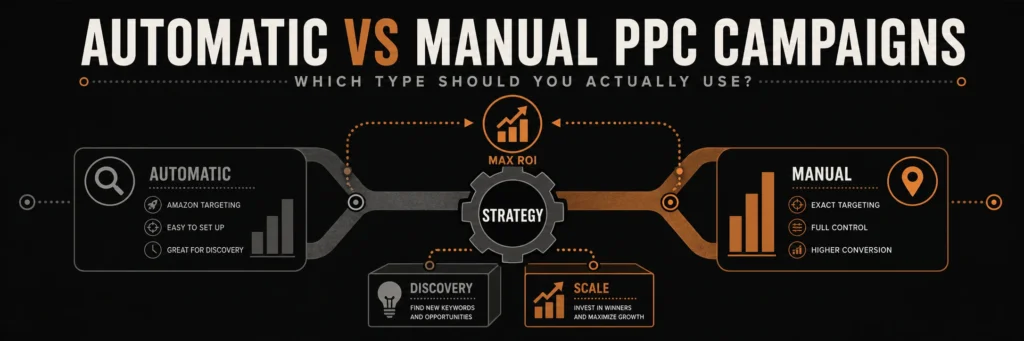
Automatic campaigns find keywords. Manual campaigns scale them. Understanding when to use each type, and how to combine them, is the key to profitable Amazon PPC.
The truth: Most successful Amazon sellers use both Automatic and Manual campaigns in a coordinated strategy. Automatic campaigns discover keywords, while Manual campaigns scale profitable ones.
In this comprehensive guide, we’ll break down Automatic vs Manual campaigns, show you when to use each, and teach you how to create a winning campaign strategy that maximizes ROI.
What Are Amazon Automatic Campaigns?
Definition:
Amazon Automatic campaigns let Amazon’s algorithm automatically target your ads based on your product listing. You don’t choose keywords—Amazon does it for you.
How Automatic Campaigns Work:
- Amazon analyzes your listing:
- Product title
- Bullet points
- Product description
- Backend keywords
- Product category
- Amazon matches to searches:
- Related customer searches
- Similar product searches
- Category-based matching
- Algorithm-driven targeting
- You control:
- Daily budget
- Default bid
- Campaign name
- That’s it!
Automatic Campaign Features:
- No keyword management – Amazon handles targeting
- Broad reach – Targets many search variations
- Easy setup – Just set budget and bid
- Discovery focused – Finds keywords you’d never think of
- Low maintenance – Minimal ongoing management
What Are Amazon Manual Campaigns?
Definition:
Amazon Manual campaigns give you complete control. You choose exact keywords, set individual bids, and control match types.
How Manual Campaigns Work:
- You choose keywords:
- Specific search terms
- Based on research
- From Automatic campaigns
- Competitor analysis
- You set bids:
- Per keyword bids
- Bid adjustments
- Match type control
- Precise targeting
- You control everything:
- Which keywords to target
- How much to bid
- Match type (Broad, Phrase, Exact)
- Negative keywords
Manual Campaign Features:
- Full control – Choose every keyword
- Precise targeting – Exact search terms
- Bid optimization – Per-keyword bids
- Match type control – Broad, Phrase, Exact
- Higher maintenance – Requires ongoing optimization
Automatic vs Manual: Key Differences
Control Level:
| Aspect | Automatic | Manual |
|---|---|---|
| Keyword Selection | Amazon chooses | You choose |
| Bid Control | One default bid | Per-keyword bids |
| Match Types | Not applicable | Broad/Phrase/Exact |
| Negative Keywords | Limited | Full control |
| Optimization | Minimal | Extensive |
Use Cases:
| Scenario | Automatic | Manual |
|---|---|---|
| New Product | ✓ Best | ✗ Limited data |
| Keyword Discovery | ✓ Excellent | ✗ Need keywords first |
| Scaling Winners | ✗ Less control | ✓ Best |
| Precise Targeting | ✗ Broad reach | ✓ Best |
| Low Maintenance | ✓ Set and go | ✗ Requires work |
Performance Characteristics:
| Metric | Automatic | Manual |
|---|---|---|
| Reach | Wider | Narrower |
| Precision | Lower | Higher |
| ACoS | Often higher | Often lower |
| Volume | Can be high | More controlled |
| Efficiency | Lower | Higher |
When to Use Automatic Campaigns
Best For:
1. New Products
Why:
- No keyword data yet
- Amazon finds relevant searches
- Discovers long-tail opportunities
- Low effort, high value
Strategy:
- Start with Automatic
- Run for 1-2 weeks
- Extract search terms
- Move winners to Manual
2. Keyword Discovery
Why:
- Finds keywords you’d never think of
- Discovers search variations
- Identifies long-tail opportunities
- Reveals customer language
Strategy:
- Run Automatic continuously
- Weekly search terms review
- Harvest converting terms
- Add to Manual campaigns
3. Low Competition Niches
Why:
- Less need for precise control
- Amazon’s algorithm works well
- Lower maintenance required
- Good for testing
Strategy:
- Use Automatic as primary
- Monitor performance
- Optimize bids
- Add Manual for top keywords
4. Limited Time/Resources
Why:
- Minimal setup required
- Low maintenance
- Amazon handles optimization
- Good starting point
Strategy:
- Start with Automatic
- Learn from data
- Gradually add Manual
- Scale what works
When to Use Manual Campaigns
Best For:
1. Scaling Profitable Keywords
Why:
- Precise bid control
- Better ACoS management
- Optimize per keyword
- Maximum efficiency
Strategy:
- Move winners from Automatic
- Set optimal bids
- Use Exact Match
- Scale budget
2. High Competition Keywords
Why:
- Need precise control
- Competitive bidding required
- Strategic bid management
- Better ROI potential
Strategy:
- Manual campaigns only
- Exact Match for control
- Aggressive bidding
- Continuous optimization
3. Brand and Competitor Campaigns
Why:
- Specific keyword targeting
- Brand name protection
- Competitor targeting
- Strategic positioning
Strategy:
- Separate Manual campaigns
- Brand keywords: Lower bids
- Competitor keywords: Higher bids
- Monitor closely
4. Advanced Optimization
Why:
- Per-keyword optimization
- Match type testing
- Negative keyword control
- Maximum efficiency
Strategy:
- Full Manual setup
- Extensive optimization
- Daily monitoring
- Data-driven decisions
The Hybrid Strategy: Best of Both Worlds
Recommended Approach:
Use Both Together Strategically
Phase 1: Discovery (Weeks 1-2)
- Automatic Campaigns: Primary
- Budget: 60-70% of total
- Let Amazon find keywords
- Extract search terms weekly
- Manual Campaigns: Secondary
- Budget: 30-40% of total
- Known high-value keywords
- Brand and competitor terms
Phase 2: Optimization (Weeks 3-4)
- Automatic Campaigns: Continue
- Ongoing discovery
- Lower budget: 40-50%
- Focus on new keywords
- Manual Campaigns: Scale
- Higher budget: 50-60%
- Winners from Automatic
- Optimize bids and match types
Phase 3: Scaling (Weeks 5+)
- Automatic Campaigns: Maintenance
- 20-30% of budget
- Continuous discovery
- Harvest new opportunities
- Manual Campaigns: Primary
- 70-80% of budget
- Scaling profitable keywords
- Maximum efficiency
How to Set Up Automatic Campaigns
Step 1: Campaign Creation
- Go to Seller Central → Advertising → Campaign Manager
- Click “Create Campaign”
- Choose “Sponsored Products”
- Select “Automatic targeting”
- Name your campaign (e.g., “Auto – Discovery”)
Step 2: Campaign Settings
Settings:
- Campaign Name: Descriptive (e.g., “Auto – [Product Name]”)
- Daily Budget: Start with 10-15% of target revenue
- Start Date: Immediate or scheduled
- End Date: None (ongoing)
Step 3: Ad Group Setup
Ad Group:
- Name: Match campaign or product-specific
- Default Bid: Start conservative (e.g., $0.50-1.00)
- Products: Select products to advertise
Step 4: Launch and Monitor
After Launch:
- Let run for 1-2 weeks
- Don’t make changes too quickly
- Collect data first
- Then optimize
How to Set Up Manual Campaigns
Step 1: Campaign Creation
- Go to Seller Central → Advertising → Campaign Manager
- Click “Create Campaign”
- Choose “Sponsored Products”
- Select “Manual targeting”
- Name your campaign (e.g., “Manual – Brand Keywords”)
Step 2: Campaign Settings
Settings:
- Campaign Name: Descriptive by goal
- Daily Budget: Based on strategy
- Start Date: Immediate
- End Date: None
Step 3: Ad Group and Keywords
Ad Group Setup:
- Name: Match keyword theme
- Default Bid: Starting bid for keywords
- Products: Select products
Add Keywords:
- Research-based keywords
- From Automatic campaigns
- Competitor keywords
- Brand terms
Step 4: Match Types
Choose Match Types:
- Broad Match: Discovery, high volume
- Phrase Match: Balanced
- Exact Match: Precise, converting
Strategy:
- Start with Exact Match
- Add Phrase for testing
- Use Broad for discovery
Step 5: Bid Management
Set Bids:
- New keywords: Start conservative
- From Automatic: Based on performance
- Brand keywords: Lower bids
- Competitor keywords: Higher bids
Optimizing Automatic Campaigns
Optimization Strategies:
1. Bid Optimization
- High ACoS: Lower default bid
- Low ACoS: Raise default bid
- Test adjustments: Small changes
- Monitor impact: Weekly review
2. Search Terms Analysis
- Export weekly: Search Terms Report
- Identify winners: Converting terms
- Find losers: High-ACoS terms
- Harvest keywords: Move to Manual
3. Negative Keywords
- Add irrelevant terms: Prevent wasted clicks
- High-ACoS searches: Exclude non-converting
- Regular review: Weekly updates
- Save money: Reduce wasted spend
4. Budget Allocation
- Winners: Increase budget
- Losers: Decrease or pause
- Test new products: Allocate budget
- Scale what works: Focus on profitable
Optimizing Manual Campaigns
Optimization Strategies:
1. Keyword Performance Analysis
- Track per keyword: ACoS, conversions
- Pause losers: High ACoS, no sales
- Scale winners: Low ACoS, high sales
- Test new keywords: Regular additions
2. Bid Optimization
- Per-keyword bids: Individual optimization
- High performers: Raise bids 10-20%
- Low performers: Lower bids 20-30%
- Break-even: Test adjustments
3. Match Type Strategy
- Exact Match: Converting keywords
- Phrase Match: Testing new terms
- Broad Match: Discovery only
- Optimize based on performance
4. Negative Keywords
- Full control: Exclude irrelevant searches
- Regular updates: Weekly review
- Save money: Prevent wasted clicks
- Improve ACoS: Better targeting
Automatic vs Manual: Performance Comparison
Typical Performance:
Automatic Campaigns:
- ACoS: 25-35% (often higher)
- Volume: High (broad reach)
- Efficiency: Lower (less control)
- Maintenance: Low
Manual Campaigns:
- ACoS: 20-30% (often lower)
- Volume: Moderate (precise targeting)
- Efficiency: Higher (more control)
- Maintenance: High
Why Manual Often Has Lower ACoS:
- Precise targeting – Only relevant searches
- Bid control – Optimize per keyword
- Negative keywords – Exclude irrelevant
- Match type control – Exact = better conversion
Why Automatic Can Be Valuable:
- Keyword discovery – Finds opportunities
- Low maintenance – Set and monitor
- Broad reach – More visibility
- Time savings – Less management
Common Mistakes to Avoid
Automatic Campaign Mistakes:
- Set and Forget
- ❌ Create and never optimize
- ✅ Weekly search terms review
- Ignoring Search Terms Report
- ❌ Not harvesting keywords
- ✅ Extract winners weekly
- Too High Default Bid
- ❌ Max bid on everything
- ✅ Start conservative, adjust
- No Negative Keywords
- ❌ Wasting money on irrelevant clicks
- ✅ Regular negative keyword updates
Manual Campaign Mistakes:
- Starting with Manual Only
- ❌ Missing keyword opportunities
- ✅ Start Automatic, add Manual
- Too Many Keywords
- ❌ 100+ keywords per campaign
- ✅ Focus on 20-30 high-value keywords
- Same Bid for All Keywords
- ❌ No bid optimization
- ✅ Optimize per keyword
- Ignoring Match Types
- ❌ Only using one match type
- ✅ Test all three, optimize
Which Should You Use? Decision Framework
Use Automatic If:
- ✅ New product with no keyword data
- ✅ Want keyword discovery
- ✅ Limited time for management
- ✅ Low competition niche
- ✅ Testing new products
Use Manual If:
- ✅ Have keyword data from Automatic
- ✅ Want precise control
- ✅ High competition keywords
- ✅ Scaling profitable terms
- ✅ Brand/competitor campaigns
Use Both If:
- ✅ Want maximum results (recommended)
- ✅ Have time for optimization
- ✅ Serious about PPC success
- ✅ Multiple products
- ✅ Scaling business
Conclusion: Use Both Strategically
The Automatic vs Manual debate misses the point: You should use both strategically. Automatic campaigns discover keywords, while Manual campaigns scale profitable ones.
Recommended Strategy:
- Start with Automatic – Discover keywords
- Harvest winners – Move to Manual
- Scale Manual – Focus budget on profitable
- Keep Automatic – Continuous discovery
- Optimize both – Regular improvements
Remember: Automatic and Manual aren’t competitors—they’re teammates. Use Automatic for discovery, Manual for scaling, and both for maximum Amazon PPC success.
Need Help with Amazon PPC Campaign Strategy?
Our Amazon PPC management service creates and optimizes both Automatic and Manual campaigns. We’ll discover profitable keywords, scale winners, and manage your campaigns for maximum ROI.
ACoS (Advertising Cost of Sale) is the most important metric in Amazon PPC advertising. Understanding what ACoS means and how to achieve profitable ACoS is the difference between profitable advertising and wasted ad spend.
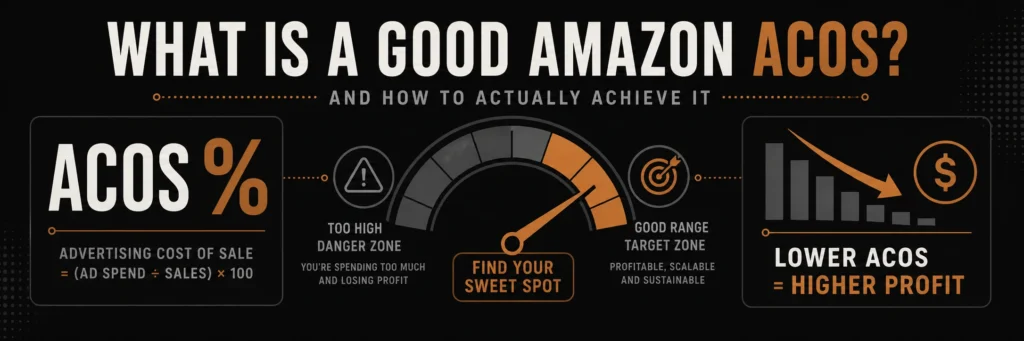
A good ACoS depends on your margin, not a universal number. This guide explains how to calculate your target ACoS and build a campaign strategy around it.
Many Amazon sellers struggle with ACoS because they don’t understand:
- What ACoS actually means
- What a “good” ACoS is for their product
- How to calculate target ACoS
- How to optimize campaigns to achieve it
In this comprehensive guide, we’ll demystify Amazon ACoS. You’ll learn how to calculate it, determine your target, and implement strategies to achieve profitable ACoS that drives sustainable growth.
What is Amazon ACoS?
ACoS Definition:
ACoS = (Advertising Spend ÷ Advertising Revenue) × 100
In simple terms: ACoS is the percentage of your ad sales that goes to advertising costs.
ACoS Example:
Scenario:
- You spend $100 on Amazon ads
- Those ads generate $500 in sales
- ACoS = ($100 ÷ $500) × 100 = 20%
This means: For every $1 in ad sales, you spent $0.20 on advertising.
ACoS vs ROAS:
ACoS (Advertising Cost of Sale):
- Lower is better
- Shows cost as percentage of sales
- Example: 20% ACoS = $0.20 cost per $1 sale
ROAS (Return on Ad Spend):
- Higher is better
- Shows revenue per $1 spent
- Example: 5x ROAS = $5 revenue per $1 spent
- Conversion: ROAS = 1 ÷ (ACoS ÷ 100)
Example:
- 20% ACoS = 5x ROAS
- 25% ACoS = 4x ROAS
- 33% ACoS = 3x ROAS
What is a Good ACoS on Amazon?
The Answer: It Depends on Your Profit Margin
There’s no universal “good” ACoS because it depends on your product’s profit margin. Here’s how to determine your target:
ACoS by Profit Margin:
| Product Profit Margin | Target ACoS | Healthy Range | Maximum ACoS |
|---|---|---|---|
| 50%+ | 25-35% | 20-40% | 40% |
| 40-50% | 20-30% | 15-35% | 35% |
| 30-40% | 15-25% | 10-30% | 30% |
| 20-30% | 10-20% | 5-25% | 25% |
| 10-20% | 5-15% | 0-20% | 20% |
| Under 10% | 0-10% | 0-15% | 15% |
General Rule:
Target ACoS = Profit Margin – 10-15%
Example:
- Product profit margin: 35%
- Target ACoS: 35% – 10% = 25%
- Healthy range: 20-30%
Why This Formula Works:
At target ACoS:
- You maintain profitability
- Leave room for other costs
- Allow for fluctuations
- Enable sustainable growth
How to Calculate Your Target ACoS
Step 1: Calculate Your Profit Margin
Profit Margin Formula: Profit Margin = ((Selling Price – Total Costs) ÷ Selling Price) × 100
Total Costs Include:
- Product cost
- Amazon fees (referral, FBA)
- Shipping costs
- Advertising (current)
- Returns and refunds
- Other overhead
Example:
- Selling Price: $50
- Product Cost: $15
- Amazon Fees: $7.50 (15%)
- FBA Fees: $5
- Shipping: $2
- Returns (2%): $1
- Total Costs: $30.50
- Profit: $19.50
- Profit Margin: ($19.50 ÷ $50) × 100 = 39%
Step 2: Determine Target ACoS
Target ACoS = Profit Margin – 10-15%
From example above:
- Profit Margin: 39%
- Target ACoS: 39% – 12% = 27%
- Healthy Range: 22-32%
Step 3: Set Campaign Targets
Campaign Structure:
- Brand Campaign: Lower ACoS (15-20%) – Brand searches convert well
- Generic Campaign: Target ACoS (25-30%) – Category keywords
- Competitor Campaign: Higher ACoS (30-35%) – Competitive but valuable
- Discovery Campaign: Highest ACoS (35-40%) – Finding new keywords
Factors That Affect ACoS
1. Product Profit Margin
Higher margin = Higher ACoS tolerance:
- 50% margin can sustain 30-35% ACoS
- 20% margin needs 10-15% ACoS
- Calculate your margin first
2. Competition Level
High competition = Higher ACoS:
- Competitive niches require higher bids
- Lower competition = lower ACoS possible
- Research your competition
3. Keyword Intent
Commercial intent = Better ACoS:
- Brand keywords: Lower ACoS (high intent)
- Generic keywords: Higher ACoS (broader)
- Long-tail keywords: Lower ACoS (specific)
4. Listing Quality
Better listing = Better ACoS:
- High conversion rate = Lower ACoS
- Poor listing = Wasted clicks = Higher ACoS
- Optimize listing for conversions
5. Seasonality
Peak seasons = Higher ACoS:
- Holiday seasons: More competition
- Off-season: Lower competition
- Adjust targets seasonally
How to Lower Your Amazon ACoS
Strategy 1: Optimize Your Listing
Impact: Can improve ACoS by 10-20%
How:
- Improve conversion rate
- Better images
- Compelling copy
- Social proof (reviews)
- Clear value proposition
Why it works:
- Higher conversion = More sales per click
- Lower cost per sale = Lower ACoS
Strategy 2: Use Negative Keywords
Impact: Can reduce ACoS by 10-15%
How:
- Export Search Terms Report weekly
- Identify high-impression, zero-sale terms
- Add as negative keywords
- Prevent wasted clicks
Example:
- Search: “headphones repair” (100 impressions, 0 sales)
- Add “repair” as negative
- Save money on irrelevant clicks
Strategy 3: Optimize Bids
Impact: Can improve ACoS by 15-25%
Bid Strategy:
- High ACoS keywords: Lower bids 20-30%
- Low ACoS keywords: Raise bids 10-20%
- Break-even keywords: Test adjustments
- New keywords: Start conservative
Bid Adjustment Formula:
- If ACoS is 40% and target is 25%: Lower bid by 30-40%
- If ACoS is 15% and target is 25%: Raise bid by 20-30%
Strategy 4: Focus on Converting Keywords
Impact: Can improve efficiency by 20-30%
How:
- Pause high-ACoS, low-converting keywords
- Scale low-ACoS, high-converting keywords
- Focus budget on winners
- Test new keywords regularly
Strategy 5: Improve Match Type Strategy
Impact: Better control = Lower ACoS
Approach:
- Exact Match: Lower ACoS (precise targeting)
- Phrase Match: Moderate ACoS (balanced)
- Broad Match: Higher ACoS (discovery)
Strategy:
- Use Exact for converting keywords
- Use Phrase for testing
- Use Broad for discovery only
Strategy 6: Product Targeting
Impact: Can lower ACoS by 10-20%
How:
- Target competitor ASINs
- Target complementary products
- Lower competition than keywords
- Often higher conversion
Strategy 7: Seasonal Optimization
Impact: Maintain profitability year-round
How:
- Adjust targets for peak seasons
- Increase budgets strategically
- Focus on high-converting keywords
- Plan for seasonality
ACoS by Campaign Type
Brand Campaign ACoS:
Target: 15-20%
- Brand searches have high intent
- Lower competition
- Higher conversion rates
- Can sustain lower ACoS
Generic Campaign ACoS:
Target: 25-30%
- Category keywords
- Moderate competition
- Balanced intent
- Standard target range
Competitor Campaign ACoS:
Target: 30-35%
- Competitive keywords
- Higher bids required
- Still valuable for visibility
- Accept higher ACoS
Discovery Campaign ACoS:
Target: 35-40%
- Finding new keywords
- Testing new terms
- Acceptable for learning
- Optimize after data
Common ACoS Mistakes
1. Chasing Unrealistic ACoS
❌ Mistake: Trying to achieve 10% ACoS on 20% margin product ✅ Solution: Set realistic targets based on margin
2. Ignoring Profit Margin
❌ Mistake: Using same ACoS target for all products ✅ Solution: Calculate target per product based on margin
3. Focusing Only on ACoS
❌ Mistake: Pausing all high-ACoS keywords ✅ Solution: Consider total profit, not just ACoS
4. Not Accounting for Organic Boost
❌ Mistake: Ignoring organic ranking improvements from PPC ✅ Solution: Factor in long-term organic value
5. Seasonal ACoS Confusion
❌ Mistake: Same ACoS target year-round ✅ Solution: Adjust for seasonality and competition
Advanced ACoS Optimization
1. Total Profit Analysis
Look beyond ACoS:
- Total Profit = Revenue – Costs
- High ACoS keyword might still be profitable
- Low ACoS keyword might have low volume
- Focus on total profit, not just ACoS
Example:
- Keyword A: 30% ACoS, $1000 sales = $300 profit
- Keyword B: 20% ACoS, $200 sales = $160 profit
- Keyword A is better despite higher ACoS
2. Lifetime Value (LTV) Consideration
Factor in repeat customers:
- First purchase might have high ACoS
- Repeat customers = no ad cost
- Calculate LTV, not just first sale
- Accept higher ACoS for new customers
3. Organic Ranking Boost
PPC improves organic:
- Sales from ads boost organic rankings
- Organic sales = no ad cost
- Factor in organic value
- Accept higher ACoS for ranking boost
4. Break-Even Analysis
When to accept higher ACoS:
- New product launches
- Competitive positioning
- Market share growth
- Long-term strategy
Measuring ACoS Success
Key Metrics to Track:
- Overall ACoS
- Total ad spend ÷ Total ad sales
- Primary profitability metric
- Monitor daily
- ACoS by Campaign
- Track per campaign type
- Identify best/worst performers
- Optimize accordingly
- ACoS by Keyword
- Individual keyword performance
- Pause high-ACoS, low-converting
- Scale low-ACoS, high-converting
- ACoS Trends
- Improving or declining?
- Seasonal patterns?
- Optimization impact?
- Total Profit
- Revenue – Total Costs
- More important than ACoS alone
- Focus on profitability
ACoS Optimization Checklist
Calculation Phase
Optimization Phase
Monitoring Phase
Conclusion: Achieve Profitable ACoS
Amazon ACoS is the key to profitable PPC advertising. Understanding what ACoS means, calculating your target based on profit margin, and implementing optimization strategies will transform your advertising from a cost center into a profit driver.
Key Takeaways:
- ACoS depends on profit margin – No universal “good” ACoS
- Target = Margin – 10-15% – Ensures profitability
- Optimize continuously – Daily monitoring, weekly optimization
- Focus on total profit – Not just ACoS percentage
- Factor in long-term value – Organic boost, LTV, market share
Remember: ACoS is a tool, not a goal. The goal is profitability and growth. Use ACoS to guide optimization, but always consider total profit and long-term value.
Need Help Achieving Profitable ACoS?
Our Amazon PPC management service helps you achieve and maintain profitable ACoS targets. We’ll optimize your campaigns, manage bids strategically, and scale profitable keywords that drive sustainable growth.
Amazon PPC (Pay-Per-Click) advertising is essential for Amazon success. But most sellers waste money on unprofitable campaigns because they don’t understand how to properly manage Amazon PPC.
The difference between profitable and unprofitable Amazon PPC campaigns comes down to one thing: strategic management. Understanding ACoS, keyword optimization, bid management, and campaign structure can transform your advertising from a money drain into a profit driver.
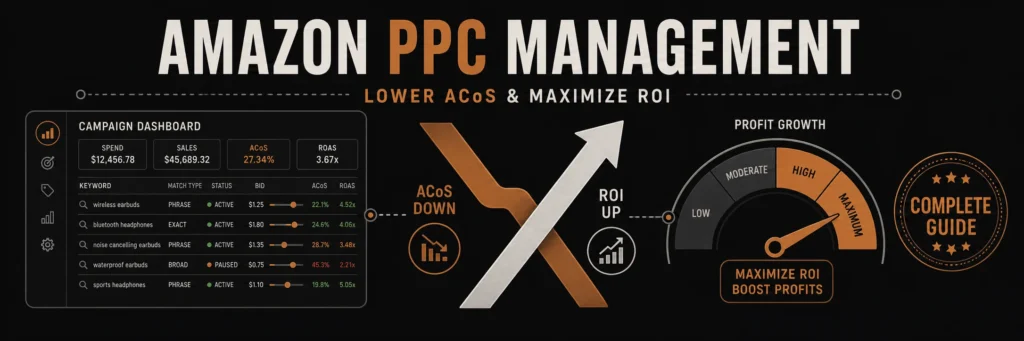
Effective Amazon PPC management is not about spending more. It is about building a system that spends smarter, lowers ACoS, and compounds ROI over time.
In this comprehensive guide, we’ll teach you everything you need to know about Amazon PPC management. You’ll learn proven strategies to lower ACoS, maximize ROI, and scale profitable campaigns that drive real sales growth.
What is Amazon PPC?
Amazon PPC (Pay-Per-Click) is Amazon’s advertising platform that allows sellers to promote products at the top of search results and on product detail pages. You only pay when someone clicks your ad.
Types of Amazon Ads:
1. Sponsored Products
- Most common – Individual product ads
- Appear in: Search results, product pages
- Best for: Direct product promotion
- Control: Keywords, bids, targeting
2. Sponsored Brands
- Brand-focused – Showcase multiple products
- Appear in: Top of search, brand store
- Best for: Brand awareness and store traffic
- Control: Brand keywords, product selection
3. Sponsored Display
- Retargeting – Show ads to previous visitors
- Appear in: Product pages, off-Amazon sites
- Best for: Retargeting and remarketing
- Control: Audience targeting, product targeting
Why Amazon PPC Management Matters
The Challenge:
- Average ACoS: 25-35% (many sellers see 40%+)
- Wasted ad spend: Up to 50% on non-converting keywords
- Poor campaign structure: Leads to inefficient spending
- Lack of optimization: Set it and forget it = money down the drain
The Opportunity:
- Profitable ACoS: 15-25% achievable with proper management
- ROI potential: 3-5x return on ad spend
- Organic boost: PPC can improve organic rankings
- Scalable growth: Profitable campaigns can scale infinitely
Understanding ACoS (Advertising Cost of Sale)
What is ACoS?
ACoS = (Ad Spend ÷ Ad Sales) × 100
Example:
- Ad Spend: $100
- Ad Sales: $500
- ACoS: ($100 ÷ $500) × 100 = 20%
What is a Good ACoS?
It depends on your profit margin:
| Product Margin | Target ACoS | Healthy Range |
|---|---|---|
| 50%+ | 25-35% | 20-40% |
| 30-50% | 20-30% | 15-35% |
| 20-30% | 15-25% | 10-30% |
| Under 20% | 10-20% | 5-25% |
General Rule: Target ACoS should be 10-15% below your profit margin to ensure profitability.
ACoS vs ROAS:
ACoS (Advertising Cost of Sale):
- Lower is better
- Shows cost as % of sales
- Example: 20% ACoS = $0.20 cost per $1 sale
ROAS (Return on Ad Spend):
- Higher is better
- Shows revenue per $1 spent
- Example: 5x ROAS = $5 revenue per $1 spent
- Formula: ROAS = 1 ÷ (ACoS ÷ 100)
Amazon PPC Campaign Structure
Campaign Types:
1. Automatic Campaigns
- Purpose: Keyword discovery
- How it works: Amazon targets based on your listing
- Best for: New products, finding keywords
- Control: Limited (just budget and bid)
2. Manual Campaigns
- Purpose: Precise keyword targeting
- How it works: You choose exact keywords
- Best for: Scaling profitable keywords
- Control: Full (keywords, bids, match types)
Match Types:
Broad Match
- Reach: Widest (includes variations)
- Control: Least precise
- Use for: Discovery, high-volume terms
- Example: “headphones” matches “wireless headphones”, “bluetooth headphones”
Phrase Match
- Reach: Moderate (must include phrase)
- Control: More precise
- Use for: Balanced reach and control
- Example: “wireless headphones” matches “best wireless headphones” but not “headphones wireless”
Exact Match
- Reach: Narrowest (exact term only)
- Control: Most precise
- Use for: High-intent, converting keywords
- Example: “wireless headphones” only matches exact search
Amazon PPC Management Strategy
Phase 1: Discovery (Weeks 1-2)
Goal: Find profitable keywords
Actions:
- Start with Automatic Campaigns
- Budget: 10-15% of target revenue
- Let Amazon find keywords
- Run for 1-2 weeks
- Analyze Performance
- Identify converting keywords
- Find high-ACoS keywords to pause
- Extract search terms report
- Harvest Winners
- Move profitable keywords to Manual campaigns
- Start with Exact Match
- Set bids based on Automatic performance
Phase 2: Optimization (Weeks 3-4)
Goal: Lower ACoS and improve efficiency
Actions:
- Negative Keywords
- Add non-converting search terms
- Exclude irrelevant searches
- Reduce wasted spend
- Bid Optimization
- Lower bids on high-ACoS keywords
- Raise bids on low-ACoS keywords
- Use bid adjustments strategically
- Keyword Refinement
- Pause unprofitable keywords
- Scale profitable keywords
- Test new keyword variations
Phase 3: Scaling (Weeks 5+)
Goal: Grow profitable campaigns
Actions:
- Increase Budgets
- Scale winning campaigns
- Expand to new keywords
- Test new match types
- Campaign Expansion
- Add related keywords
- Test new products
- Explore new match types
- Advanced Strategies
- Product targeting
- Competitor targeting
- Seasonal optimization
Amazon PPC Best Practices
1. Start with Automatic Campaigns
Why:
- Amazon finds keywords you’d never think of
- Discovers long-tail opportunities
- Identifies converting search terms
- Low effort, high value
How:
- Set reasonable budget
- Let run for 1-2 weeks
- Extract search terms report
- Harvest winners to Manual
2. Use Negative Keywords Strategically
Purpose: Exclude irrelevant searches
How to Find:
- Search Terms Report
- High impressions, zero sales
- High ACoS keywords
- Irrelevant search terms
Example:
- Selling “wireless headphones”
- Negative: “cheap”, “free”, “used”, “repair”
3. Optimize Bids Based on Performance
Bid Strategy:
- High ACoS keywords: Lower bids or pause
- Low ACoS keywords: Raise bids to get more traffic
- Break-even keywords: Test bid adjustments
- New keywords: Start conservative, adjust up
Bid Adjustment Formula:
- If ACoS is 40% and target is 25%: Lower bid by 30-40%
- If ACoS is 15% and target is 25%: Raise bid by 20-30%
4. Structure Campaigns by Goal
Campaign Organization:
- Brand Campaign: Your brand name keywords
- Competitor Campaign: Competitor brand keywords
- Generic Campaign: Product category keywords
- Long-tail Campaign: Specific, low-competition terms
Benefits:
- Easier management
- Better performance tracking
- Clearer optimization
- Scalable structure
5. Monitor and Adjust Daily
Daily Tasks:
- Check campaign performance
- Review search terms report
- Add negative keywords
- Adjust bids
- Pause unprofitable keywords
Weekly Tasks:
- Analyze overall performance
- Review ACoS trends
- Plan optimizations
- Test new strategies
6. Use Product Targeting
Beyond Keywords:
- Target competitor ASINs
- Target complementary products
- Target category pages
- Lower competition, higher conversion
7. Optimize for Mobile
Mobile Considerations:
- 70%+ of Amazon traffic is mobile
- Mobile users convert differently
- Test mobile-specific bids
- Optimize for mobile experience
Lowering ACoS: Proven Strategies
Strategy 1: Negative Keyword Optimization
Impact: Can reduce ACoS by 10-20%
How:
- Export Search Terms Report weekly
- Identify high-impression, zero-sale terms
- Add as negative keywords
- Monitor impact on ACoS
Example:
- Search term: “headphones repair” (100 impressions, 0 sales)
- Add “repair” as negative keyword
- Save wasted spend on irrelevant clicks
Strategy 2: Bid Management
Impact: Can improve ACoS by 15-25%
Bid Optimization:
- High performers: Raise bids 10-20% to get more traffic
- Low performers: Lower bids 20-30% or pause
- New keywords: Start 20% below average bid
- Test adjustments: Small changes, measure impact
Strategy 3: Keyword Harvesting
Impact: Can improve efficiency by 20-30%
Process:
- Run Automatic campaigns
- Extract Search Terms Report
- Identify converting keywords
- Move to Manual Exact Match
- Set bids based on performance
- Scale profitable keywords
Strategy 4: Match Type Strategy
Impact: Better control = lower ACoS
Approach:
- Broad Match: Discovery, high volume
- Phrase Match: Balanced reach/control
- Exact Match: High-intent, converting
Strategy:
- Start with Exact Match for control
- Use Broad for discovery
- Use Phrase for balance
- Optimize based on performance
Strategy 5: Campaign Segmentation
Impact: Better management = better results
Structure:
- Separate campaigns by goal
- Different budgets per campaign
- Easier optimization
- Clearer performance tracking
Amazon PPC Management Tools
Free Tools:
- Amazon Seller Central – Built-in PPC dashboard
- Amazon Brand Analytics – Search term insights (Brand Registry)
Paid Tools (Worth It):
Helium 10 – Adtomic
- Best for: Comprehensive PPC management
- Features: Keyword research, bid optimization, automation
- Cost: $97-397/month
- Why: Saves hours, improves performance
Sellics (now Perpetua)
- Best for: Automated bid management
- Features: AI-powered optimization, automation
- Cost: $99-499/month
- Why: Set it and optimize automatically
Jungle Scout – Ad Manager
- Best for: Keyword tracking and optimization
- Features: Keyword research, performance tracking
- Cost: $49-129/month
- Why: User-friendly, effective
Common Amazon PPC Mistakes
1. Set It and Forget It
❌ Mistake: Create campaigns and never optimize ✅ Solution: Daily monitoring and weekly optimization
2. Ignoring Negative Keywords
❌ Mistake: Wasting money on irrelevant clicks ✅ Solution: Weekly negative keyword review
3. Bidding Too High
❌ Mistake: Max bids on all keywords ✅ Solution: Start conservative, adjust based on performance
4. Not Using Automatic Campaigns
❌ Mistake: Only Manual campaigns from start ✅ Solution: Start Automatic to discover keywords
5. Poor Campaign Structure
❌ Mistake: All keywords in one campaign ✅ Solution: Organize by goal and match type
6. Ignoring Search Terms Report
❌ Mistake: Not reviewing actual search terms ✅ Solution: Weekly analysis and optimization
7. Not Testing
❌ Mistake: Same strategy forever ✅ Solution: Continuous testing and optimization
Measuring PPC Success
Key Metrics:
- ACoS (Advertising Cost of Sale)
- Primary profitability metric
- Target: 10-15% below profit margin
- Monitor daily
- ROAS (Return on Ad Spend)
- Revenue per $1 spent
- Target: 3-5x minimum
- Higher = better
- Impressions
- How many times ad shown
- Indicates visibility
- More = better reach
- Click-Through Rate (CTR)
- Clicks ÷ Impressions
- Target: 0.5-1%+
- Higher = better ad relevance
- Conversion Rate
- Sales ÷ Clicks
- Target: 10-15%+
- Higher = better listing quality
- Total Sales
- Revenue from ads
- Track growth over time
- Scale profitable campaigns
Amazon PPC Management Checklist
Campaign Setup
Ongoing Management
Optimization
Conclusion: Master Amazon PPC Management
Amazon PPC management is the difference between profitable advertising and wasted ad spend. With proper strategy, optimization, and ongoing management, you can achieve profitable ACoS and scale campaigns that drive real growth.
Key Principles:
- Start with Automatic – Discover keywords first
- Optimize continuously – Daily monitoring, weekly optimization
- Use negative keywords – Reduce wasted spend
- Manage bids strategically – Based on performance data
- Structure campaigns well – Easier management and optimization
Remember: Amazon PPC is a tool for growth, not a cost center. When managed properly, it drives sales, improves organic rankings, and scales your business profitably.
Need Professional Amazon PPC Management?
Our Amazon PPC management service handles everything from campaign setup to ongoing optimization. We’ll help you achieve profitable ACoS, maximize ROI, and scale campaigns that drive sustainable growth.
Amazon negative keywords are one of the most powerful yet underutilized tools in PPC management. When used correctly, they can dramatically reduce wasted ad spend, lower your ACoS, and improve campaign profitability. This guide will show you exactly how to implement negative keywords effectively.
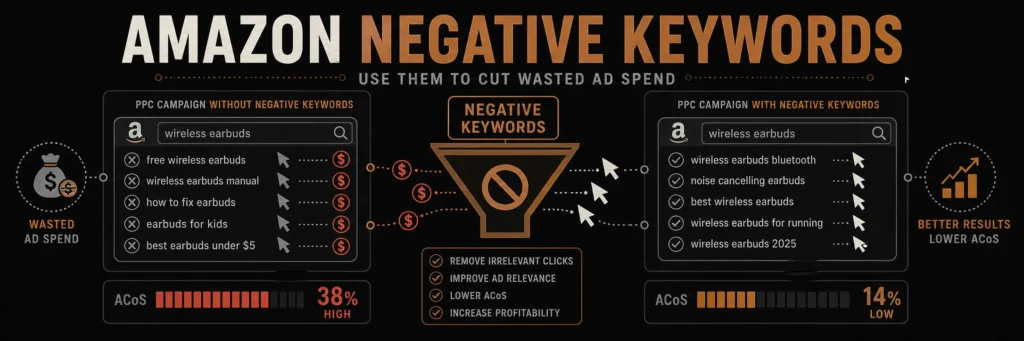
Negative keywords are the fastest way to cut wasted Amazon ad spend. This guide explains how to find them, add them, and maintain them as campaigns grow.
What Are Amazon Negative Keywords?
Amazon negative keywords are search terms that you explicitly tell Amazon not to show your ads for. When a customer searches using a negative keyword, your ad won’t appear, even if the keyword matches your product.
Why Negative Keywords Matter
- Reduce Wasted Spend: Stop paying for clicks that won’t convert
- Lower ACoS: Improve your advertising cost of sale by eliminating irrelevant traffic
- Better Targeting: Focus your budget on high-intent customers
- Improved ROI: Increase return on ad spend by showing ads only to qualified buyers
Types of Negative Keywords on Amazon
1. Exact Match Negative Keywords
Exact match negative keywords prevent your ads from showing when customers search for that exact phrase. For example, if you sell premium headphones, you might add “cheap headphones” as a negative keyword.
2. Phrase Match Negative Keywords
Phrase match negatives block your ads when the negative keyword appears as part of a search query. For instance, “wireless” as a negative would block searches like “wireless headphones” but not “headphones wireless.”
3. Broad Match Negative Keywords
Broad match negatives prevent ads from showing for variations, synonyms, and related terms. This is the most aggressive form of negative keyword targeting.
How to Add Negative Keywords to Amazon Campaigns
Step 1: Access Campaign Manager
- Log into Amazon Seller Central
- Navigate to Advertising → Campaign Manager
- Select the campaign you want to modify
- Click on Negative Keywords tab
Step 2: Add Negative Keywords
- Click Add negative keywords
- Enter your negative keywords (one per line or comma-separated)
- Choose match type (exact, phrase, or broad)
- Click Add to save
Step 3: Review and Optimize
- Monitor search term reports weekly
- Add new negative keywords based on poor-performing search terms
- Remove negative keywords if they’re blocking profitable traffic
Where to Find Negative Keyword Opportunities
1. Search Term Reports
The most valuable source for negative keywords is your search term report. Look for:
- Search terms with high spend but zero sales
- Search terms with high ACoS (above your target)
- Irrelevant search queries that don’t match your product
2. Competitor Analysis
Review competitor listings to identify keywords they’re targeting that don’t apply to your product. If competitors are bidding on terms that don’t match your offering, add those as negatives.
3. Product-Specific Exclusions
Consider your product’s unique features and add negatives for:
- Competing product types you don’t sell
- Price ranges you don’t compete in
- Features your product doesn’t have
Amazon Negative Keyword Best Practices
1. Start Broad, Then Get Specific
Begin with broad negative keywords to eliminate entire categories of irrelevant traffic, then add specific terms based on search term report data.
2. Use Negative Keywords at Campaign and Ad Group Level
- Campaign level: Block terms that don’t apply to any products in the campaign
- Ad group level: Block terms that don’t apply to specific products
3. Regular Review Schedule
Set a weekly or bi-weekly review schedule to:
- Analyze search term reports
- Add new negative keywords
- Remove negatives that might be blocking profitable traffic
4. Document Your Strategy
Keep a spreadsheet of:
- Negative keywords added
- Date added
- Reason for adding (high ACoS, irrelevant traffic, etc.)
- Performance impact after adding
Common Negative Keyword Mistakes to Avoid
Mistake 1: Being Too Aggressive
Adding too many negative keywords can block profitable traffic. Start conservatively and add negatives based on data.
Mistake 2: Not Reviewing Regularly
Negative keywords need ongoing optimization. Set aside time weekly to review and update your negative keyword lists.
Mistake 3: Ignoring Search Term Reports
Your search term report is gold for finding negative keyword opportunities. Review it regularly to identify wasted spend.
Mistake 4: Copying Competitors Blindly
Don’t copy negative keyword lists from competitors without understanding why those terms are negative. Your product and strategy may differ.
Real-World Examples of Negative Keywords
Example 1: Premium Product Seller
If you sell premium headphones ($200+), add negatives like:
- “cheap headphones”
- “budget headphones”
- “affordable headphones”
- “under $50”
Example 2: Brand-Specific Seller
If you only sell your own brand, add competitor brand names as negatives:
- Competitor brand names
- Generic product terms that competitors use
Example 3: Size-Specific Products
If you only sell large sizes, add negatives for:
- “small”
- “medium”
- “petite”
- “compact”
Measuring Negative Keyword Performance
Key Metrics to Track
- ACoS Reduction: Measure ACoS before and after adding negatives
- Click-Through Rate: Should improve as ads become more relevant
- Conversion Rate: Should increase with better-targeted traffic
- Total Spend: Should decrease while maintaining or improving sales
A/B Testing Negative Keywords
Test negative keyword strategies by:
- Running two similar campaigns (one with negatives, one without)
- Comparing performance over 2-4 weeks
- Implementing winning strategy across all campaigns
Advanced Negative Keyword Strategies
1. Seasonal Negative Keywords
Add seasonal terms as negatives when they don’t apply:
- “Christmas” (if selling non-holiday items)
- “summer” (if selling winter products)
- “gift” (if targeting non-gift buyers)
2. Intent-Based Negatives
Block search terms that indicate wrong intent:
- “free” (if you don’t offer free products)
- “tutorial” (if selling products, not education)
- “review” (if you want purchase intent, not research)
3. Competitor Brand Negatives
If customers searching for competitor brands won’t buy your product, add those brand names as negatives.
Negative Keywords and Campaign Structure
Automatic Campaigns
For automatic campaigns, use negative keywords to:
- Block irrelevant automatic targeting
- Refine broad automatic placements
- Improve automatic campaign efficiency
Manual Campaigns
In manual campaigns, negatives help:
- Refine keyword targeting
- Prevent overlap between ad groups
- Improve budget allocation
Tools for Negative Keyword Research
1. Amazon Search Term Reports
Your primary tool – export and analyze weekly to find negative opportunities.
2. Google Keyword Planner
Use to find related terms that might be irrelevant to your product.
3. Amazon Brand Analytics
Access search query data to identify terms customers use that don’t match your product.
Checklist: Implementing Negative Keywords
Common Questions About Amazon Negative Keywords
Can I add too many negative keywords?
Yes, being too aggressive can block profitable traffic. Start with obvious negatives and add more based on data.
How often should I review negative keywords?
Weekly or bi-weekly reviews are ideal. Monthly minimum for active campaigns.
Do negative keywords work in automatic campaigns?
Yes, negative keywords can help refine automatic campaign targeting and reduce wasted spend.
Can I remove negative keywords later?
Absolutely. If you find a negative keyword is blocking profitable traffic, remove it immediately.
Conclusion
Amazon negative keywords are essential for optimizing PPC campaigns and reducing wasted ad spend. By regularly reviewing search term reports, adding strategic negatives, and monitoring performance, you can significantly improve your campaign ROI and lower ACoS.
Start implementing negative keywords today by reviewing your search term reports and identifying the top 10-20 terms causing wasted spend. Even small improvements in negative keyword management can lead to substantial cost savings and better campaign performance.
Ready to optimize your Amazon PPC campaigns? Contact advertpreneur for expert Amazon PPC management services. We help sellers reduce ACoS, improve ROI, and scale profitable advertising campaigns.