Amazon has made Seller University more useful for teams, agencies, and prospective sellers by removing a key access barrier. In an official Sell on Amazon announcement, Amazon said Seller University is now available without a selling account or login. That gives Amazon sellers, service providers, virtual assistants, ecommerce operators, and brand teams a cleaner way to train people before giving them Seller Central access.
For US operators, this is not just a learning-resource update. It changes how Amazon training can be built into onboarding, SOPs, account audits, and agency handoffs. When teams can point staff to official Amazon material before they touch live catalog, fulfillment, pricing, advertising, or account-health workflows, the margin for preventable errors gets smaller.
What The Official Amazon Source Says
Amazon says Seller University is a free education resource covering Amazon selling topics across experience levels. The announcement says users can now access Amazon’s full library of seller education without a selling account, including on-demand content across more than 125 topics.
Amazon’s Seller University page describes training for listing, pricing, fulfillment, advertising, A+ Content, Brand Analytics, inventory management, account health, brand programs, and global selling. A related Amazon Seller Forums post also says the content can now be shared with team members, virtual assistants, or business partners without requiring their own seller login.
Why This Matters For Amazon Sellers
Amazon Seller Central workflows are operationally sensitive. A poorly trained team member can break variation families, send inventory to the wrong place, misread Amazon FBA requirements, create weak listings, miss account-health warnings, or waste Amazon Ads budget. Seller University open access gives brands a safer training layer before internal permissions are granted.
For new sellers, the benefit is obvious: they can study listing creation, pricing, fulfillment, and advertising before registration or launch. For established sellers, the larger opportunity is process control. Seller education can become part of a recurring operating rhythm instead of a one-time onboarding task.
Training Checklist For Seller Central Teams
- Map training to roles. Build separate learning paths for catalog, inventory, customer service, Amazon Ads, Brand Registry, and account-health responsibilities.
- Require official-source review before access. New staff should complete relevant Seller University content before receiving Seller Central permissions.
- Pair training with internal SOPs. Amazon explains the platform rules and workflows; your SOPs should explain how your brand applies them.
- Use it for agency alignment. Agencies and service providers can send official modules before kickoff so client teams understand core terminology and workflow dependencies.
- Refresh training quarterly. Revisit listing quality, FBA, Amazon Ads, Brand Registry, and account-health material as Amazon marketplace updates change operational expectations.
- Document completion. Track who has reviewed each topic so catalog edits, ad changes, and operational permissions are tied to actual preparation.
What Agencies And Service Providers Should Do
Amazon service providers should use Seller University as a client education asset, not a replacement for strategy. The stronger model is to connect Amazon’s official training to real account decisions: which ASINs need better listing content, which fulfillment workflows create risk, which Sponsored Products campaigns need structure, and where Brand Registry or A+ Content should support conversion.
This is especially useful for US brands working with distributed teams. Instead of explaining every Seller Central concept from scratch, agencies can assign official training first, then spend advisory time on the client’s actual catalog, competitive position, and growth priorities.
SEO And Marketplace Strategy Angle
The open-access move also matters because official Amazon resources can be easier to share, cite, and discover. Sellers searching for Amazon seller updates, Amazon Seller Central training, Amazon FBA education, Amazon Ads basics, and Brand Registry workflows now have a cleaner official path to start from.
Advertpreneur’s Amazon SEO service, Amazon PPC Management service, and A+ Content Design service sit downstream of that training layer. Education helps teams understand the platform; strategy turns that understanding into better ranking, conversion, and profitable advertising execution.
Source References
This article is based on official Amazon sources: Seller University is now available for everyone, Learn about Seller University, and the Amazon Seller Forums post Learn more about selling in the Amazon store on Seller University.
Conclusion
Amazon Seller University open access is a practical update because it makes seller education easier to standardize. US ecommerce brands should use it to reduce preventable account mistakes, improve onboarding, and create a stronger operating foundation before teams work inside Seller Central.
The strategic move is simple: do not treat training as optional background material. Make official Amazon education part of the same growth system as listing optimization, Amazon Ads, FBA readiness, Brand Registry protection, and marketplace reporting.
Amazon Ads is making the AI shopping shift harder for sellers and agencies to ignore. In official Amazon Ads guidance published on August 5, 2026, Amazon explained how brands can connect with shoppers who are using AI agents to research, compare, and narrow product choices before a human buyer makes the final decision.
For Amazon sellers, Amazon Ads teams, and ecommerce service providers in the United States, the practical takeaway is clear: product content now has to serve both people and machine-assisted shopping journeys. Weak titles, thin product details, missing comparison context, poor imagery, inconsistent pricing signals, and neglected reviews can all reduce how confidently an AI assistant understands and recommends a product.
What The Official Amazon Ads Guidance Covers
Amazon Ads says AI shopping agents synthesize information across product details, reviews, pricing, inventory, and brand content. The guidance frames structure as a competitive advantage because AI-led shopping experiences depend on clear, organized, and complete product information.
Amazon also connects this trend to Alexa for Shopping, Sponsored Products and Sponsored Brands prompts, Alexa+ Conversational Ads, Prime Video Sponsored Tiles, and wider AI-powered Amazon Ads tools. A related official Amazon Ads newsroom article from June 11, 2026, explains that existing sponsored ads campaigns can become part of Alexa for Shopping conversational experiences without a separate setup path.
Why This Matters For Amazon Sellers
The old listing optimization model focused mainly on human search behavior: keyword relevance, image clarity, conversion copy, ratings, and price. Those fundamentals still matter, but AI shopping adds another layer. Sellers now need product pages that are easy for an assistant to interpret with confidence.
That means Amazon Seller Central operators should treat every major ASIN as a structured information asset. Product titles need to be specific without becoming cluttered. Bullet points should answer real shopper questions. A+ Content should clarify use cases, materials, sizing, compatibility, differentiation, and trust signals. Images should help shoppers and AI-assisted journeys understand the product quickly.
For Amazon FBA and FBM sellers, this is not only an Amazon Ads issue. If inventory availability, reviews, pricing, and content quality are inconsistent, the product may look weaker in a comparison-driven path even when the ad campaign is technically active.
Action Checklist For Amazon Seller Central Teams
- Audit top ASINs for information gaps. Check titles, bullets, A+ Content, images, variation structure, review themes, pricing, and inventory health.
- Rewrite bullets around decision criteria. Cover who the product is for, what problem it solves, what makes it different, and what buyers should verify before purchase.
- Improve comparison readiness. Add clear details on size, material, compatibility, bundle contents, care instructions, and use cases where relevant.
- Strengthen visual merchandising. Use lifestyle, scale, feature-callout, and comparison images that reduce uncertainty before checkout.
- Review Sponsored Products and Sponsored Brands structure. Make sure campaigns are aligned with the ASINs most likely to perform in high-intent conversational discovery.
- Monitor review language. Repeated customer questions or complaints should feed directly into listing copy, imagery, and product content updates.
What Agencies And Service Providers Should Do
Amazon service providers should update their audit frameworks. A listing review that only checks keyword placement is too narrow for agentic shopping. The stronger approach is to evaluate whether the product page can support search ranking, ad performance, human persuasion, and AI-assisted product comparison at the same time.
This is where creative, marketplace SEO, and Amazon Ads management need to work together. Advertpreneur’s A+ Content Design service and Amazon Listing Images service are directly relevant because richer visual and structured content can make the buying decision easier to understand across both traditional and AI-assisted shopping paths.
Source References
This analysis is based on official Amazon Ads sources: How brands can connect with customers who are shopping alongside AI agents and Agentic shopping is here. What does that mean for advertisers?.
Conclusion
Amazon’s AI shopping direction does not replace the fundamentals of Amazon marketplace growth. It raises the standard for them. Sellers that maintain clean product data, strong creative, persuasive A+ Content, stable inventory, and disciplined Amazon Ads structure are better positioned for discovery paths where shoppers ask questions, compare options, and expect useful recommendations quickly.
The strategic move is to stop treating content, advertising, and operations as separate lanes. For US Amazon sellers, AI shopping readiness is becoming part of the same performance system that already drives ranking, conversion, and paid media efficiency.
Amazon’s latest seller story is a useful playbook for brands trying to improve creative output without adding a full production team. In an official Amazon Selling Partners profile, Amazon highlighted how Funky Junque used Amazon’s seller ecosystem, including FBA, A+ Content, and Creative Studio, to support growth in the Amazon store.
This is not a new compliance rule or Seller Central deadline. It is a practical operator signal. Amazon is pushing more creative and content work into AI-assisted workflows, and sellers that treat creative production as an operating system will have an advantage over teams still waiting on slow one-off asset cycles.
What The Official Amazon Source Says
Amazon’s profile says Funky Junque is a Northbrook, Illinois headwear brand with thousands of active Amazon listings and a growth story built around product pivots, marketplace demand signals, FBA, A+ Content, and AI-supported creative workflows.
The story specifically points to Amazon Creative Studio as part of the brand’s content stack. Amazon describes Creative Studio as a toolset for independent sellers that can help create lifestyle images, video ads from static product images, and ready-to-run audio ads for sellers advertising in Amazon’s store.
Sources: Amazon Selling Partners profile of Funky Junque and Amazon Selling Partners Creative Studio page.
Why This Matters for Amazon Sellers
For US Amazon sellers, creative velocity is becoming part of marketplace competitiveness. Product listings, A+ Content, Sponsored Brands video, seasonal campaigns, and Amazon Ads assets all need stronger visuals than they did a few years ago. The old model of waiting weeks for every lifestyle shot, video edit, or campaign variant is too slow for sellers that need to test frequently.
Creative Studio matters because Amazon is making professional-grade asset production more accessible inside the seller ecosystem. That does not remove the need for brand strategy, product positioning, or quality control. It changes where the bottleneck sits. Sellers still need to decide what message to test, which product angle matters, and how creative connects to Amazon SEO, conversion rate, and campaign performance.
The Funky Junque story also shows a broader lesson: Amazon seller growth usually comes from connected operating decisions, not one isolated tool. Product development, catalog expansion, fulfillment, content quality, and advertising all support each other.
Operator Checklist for Creative Studio Readiness
- Audit your content gaps: Identify listings that lack strong lifestyle images, A+ Content, product-use visuals, video assets, or seasonal creative.
- Prioritize proven ASINs first: Start with products that already have demand, reviews, and traffic. Better creative has more impact when the product foundation is working.
- Build test themes: Plan creative variants around use case, audience, season, problem solved, giftability, material quality, or comparison angle.
- Connect creative to Amazon Ads: Use new visuals to support Sponsored Brands, Sponsored Brands video, Store pages, and upper-funnel campaigns where relevant.
- Keep brand control: AI-generated assets still need human review for accuracy, compliance, product truth, and brand consistency.
- Measure after launch: Track click-through rate, conversion rate, ACoS, TACoS, sessions, unit session percentage, and ranking movement after creative updates.
What Agencies and Service Providers Should Do
Amazon agencies should treat Creative Studio as a way to increase testing discipline, not as a shortcut for generic creative. The value is not simply producing more assets. The value is producing better-informed variations faster and connecting them to listing strategy, paid media, and marketplace reporting.
For service providers, this creates a clear client workflow: identify content gaps, generate controlled variants, approve brand-safe assets, deploy to the right surface, and measure the performance change. That turns creative into a repeatable growth process instead of an occasional design task.
Advertpreneur’s A+ Content Design service and Amazon Listing Images service sit in the same strategic lane: better visuals should help shoppers understand the product faster, trust the brand more, and move through the buying decision with less friction.
SEO and Marketplace Strategy Angle
Creative assets indirectly affect Amazon SEO because they influence conversion behavior. Stronger product images, A+ Content, video assets, and Store experiences can improve shopper confidence, which can support paid and organic performance when the rest of the listing is built correctly.
But creative cannot carry a weak offer by itself. Sellers should pair Creative Studio experiments with listing optimization, keyword strategy, pricing checks, review analysis, inventory readiness, and fulfillment quality. The goal is a stronger commercial system, not isolated image production.
Conclusion
The Funky Junque story gives Amazon sellers a useful reminder: growth comes from repeated operating improvements. Amazon Creative Studio can help sellers create and test visual assets faster, but the winning edge comes from using those assets with strategic discipline.
The next move is straightforward. Review your top ASINs, identify where visual content is limiting conversion, create controlled creative variants, and measure what changes. For serious Amazon operators, creative is not decoration. It is part of the marketplace growth engine.
Amazon Ads has opened another planning workflow for more technical advertisers and agencies. In its official Amazon Ads API release notes, Amazon announced a closed beta for the media plan API, built to help advertisers create and manage media plans programmatically across Amazon DSP and sponsored advertising accounts.
For US ecommerce operators, this is not a basic Seller Central update. It is a signal about where Amazon Ads operations are moving: from manual campaign planning toward connected planning systems, forecast data, audience opportunity analysis, and budget allocation workflows.
What Changed
Amazon says the media plan API is available in closed beta and supports programmatic media planning for Amazon DSP and sponsored advertising accounts. The official release notes describe capabilities for creating plans, submitting them for processing, and accessing outputs such as audience sizing, audience insights, performance forecasts, traffic insights, and optimized budget allocations.
Amazon also lists availability across several marketplaces, including the United States, and identifies agencies, managed-service advertisers, self-service advertisers, vendors, authors, book publishers, enterprises, and manager accounts as users who may benefit from the API.
Source: Amazon Ads official API release notes for the media plan API.
Why This Matters for Amazon Sellers and Agencies
Amazon Ads planning is becoming more data-driven before budget is committed. For agencies and service providers, that changes the standard of preparation. Media planning can no longer be limited to a spreadsheet, a past-month ACoS review, and a budget split by campaign type.
The media plan API points toward a more structured planning layer where audience sizing, traffic insight, forecast logic, and budget allocation can be connected to campaign execution. That is especially relevant for brands running both Amazon DSP and sponsored ads, because upper-funnel and lower-funnel activity need to be planned together rather than reviewed separately after spend has already happened.
For Amazon sellers, the practical takeaway is not that every brand needs to build against the API tomorrow. The immediate takeaway is that sellers should expect better planning discipline from their internal teams and agency partners. If an Amazon Ads account is spending meaningful budget, planning should connect audience assumptions, product readiness, retail media goals, inventory, promotions, and measurement.
What Operators Should Prepare Now
- Clean up account structure: Media planning works better when campaign naming, portfolio structure, products, objectives, and reporting windows are consistent.
- Define planning inputs: Document audience assumptions, target products, retail moments, budget limits, launch dates, and marketplace priorities before building plans.
- Separate forecast from promise: Treat API-generated forecasts as planning inputs, not guaranteed outcomes. Review actual performance against the assumptions used.
- Connect DSP and sponsored ads: If your brand uses Amazon DSP, plan how prospecting, retargeting, Sponsored Products, Sponsored Brands, and Brand Stores support the same commercial goal.
- Review measurement readiness: Make sure your Amazon Ads reporting, Seller Central sales data, and marketplace performance metrics can support post-campaign review.
Agency Strategy Implications
For Amazon service providers, this update is a reminder that clients will increasingly expect planning systems, not only campaign launches. A stronger Amazon Ads workflow should show how budget decisions are made, what audience opportunity is being pursued, and how performance will be judged after launch.
This also matters for client communication. If a plan uses forecasts, audience sizing, or optimized budget allocation, the agency should explain what those outputs mean, where they may be limited, and how they connect to a practical Amazon marketplace strategy.
Advertpreneur’s Amazon PPC management guide covers the lower-funnel campaign discipline behind profitable Sponsored Products execution. The media plan API adds a planning-layer conversation for brands that need to connect Amazon Ads activity across more of the funnel.
SEO and Marketplace Growth Angle
For US sellers, advertising planning cannot be separated from retail readiness. If listing content is weak, inventory is unstable, pricing is misaligned, or product detail pages are not conversion-ready, a more sophisticated media plan will still underperform.
The highest-value use of Amazon Ads planning is to connect spend with the actual marketplace conditions that shape return. That includes Amazon SEO, Brand Registry health, product images, A+ Content, reviews, promotions, and fulfillment performance. Better forecasts help, but stronger execution still depends on the retail foundation.
Conclusion
The Amazon Ads media plan API is currently a closed beta, but its direction is clear. Amazon is giving advanced advertisers and agencies more ways to build structured planning workflows before campaigns go live.
Sellers do not need to chase every API release. They do need to raise their planning standard. The next advantage in Amazon Ads will come from teams that can connect audience insight, budget allocation, campaign execution, and retail readiness into one operating system.
Amazon Seller Cafe is returning at Amazon Accelerate 2026, and sellers should treat it as more than another conference perk. Amazon says Seller Cafe gives registered Amazon sellers personalized, one-on-one guidance with Amazon subject-matter experts across more than 50 appointment categories.
For US Amazon sellers, agencies, and service providers, the opportunity is practical: walk into the session with the right account data, the right business question, and a clear decision you need to make afterward.
What Amazon Announced
In an official Sell on Amazon announcement, Amazon said Seller Cafe will be available during Amazon Accelerate 2026 in Seattle from September 22 to 24. Amazon says sellers can book focused 30-minute appointments, use walk-up sessions, and connect with subject-matter experts across categories that reflect common seller needs.
Amazon specifically frames Seller Cafe around tailored guidance for sellers dealing with operational questions, account challenges, advertising, fulfillment, brand building, growth opportunities, and other parts of selling in the Amazon store.
Why This Matters For Amazon Sellers
Most sellers do not need more generic advice. They need sharper diagnosis. A 30-minute expert session can be useful only if the seller arrives with a narrow issue, relevant evidence, and a clear desired outcome.
That makes preparation the real advantage. Sellers should know whether they need help with Amazon FBA performance, account health, advertising efficiency, Brand Registry, listing conversion, inventory planning, or a specific Seller Central workflow before they book.
How Sellers Should Prepare
The strongest Seller Cafe use case is a question that cannot be solved by reading help docs alone. Examples include recurring account health friction, fulfillment issues affecting growth, advertising spend that is not translating into profit, brand content questions, or operational blockers that prevent scale.
Service providers should also pay attention. If you manage Amazon accounts for clients, this is a good reason to build a pre-session brief: ASIN priorities, recent account history, campaign data, FBA constraints, and the exact decision the seller needs to make.
Practical Action Checklist
- Choose one primary business issue before booking an appointment category.
- Prepare Seller Central screenshots, ASIN examples, campaign summaries, inventory history, and account health context where relevant.
- Write the question in one sentence so the session starts with clarity.
- Separate symptoms from decisions: know what you need to decide after the meeting.
- Bring supporting data for Amazon Ads, FBA, Brand Registry, or listing performance if those areas are involved.
- Document follow-up actions immediately after the session and assign ownership.
Source Reference
This article is based on Amazon’s official announcement: Get personalized support at Seller Cafe at Amazon Accelerate 2026.
Advertpreneur Take
Amazon Seller Cafe is valuable when sellers use it like an operating review, not a casual Q&A. The sellers who get the most from expert access will be the ones who bring structured evidence, specific questions, and a clear plan to convert guidance into execution.
For US Amazon sellers preparing for Accelerate 2026, the work starts before the booking window. Build the brief first. Then use the appointment to remove friction from the parts of the account that actually drive growth.
Amazon’s latest seller update is not just another AI announcement. It signals a shift in how Amazon Seller Central operations may be managed: from reactive dashboard checks to proactive AI-supported decision-making across inventory, account health, compliance, and advertising.
For US Amazon sellers, agencies, FBA operators, and service providers, the practical question is simple: how ready is the business for an assistant that can analyze seller data, recommend actions, and eventually help execute approved tasks?
What Amazon Changed
In an official Amazon announcement, Amazon said Seller Assistant is evolving into an always-on, agentic AI-powered partner for sellers. Amazon says the upgraded assistant can reason, plan, monitor account conditions, recommend actions, and help take action when a seller gives permission.
The update is powered by Amazon Bedrock and uses Amazon Nova and Anthropic Claude. Amazon says Seller Assistant is currently available to all sellers in the US store at no additional cost, with rollout to other countries planned in the coming months.
Why This Matters For Amazon Sellers
The biggest impact is operational. Seller Assistant is being positioned less like a help chatbot and more like a business operations layer inside the Amazon marketplace. That matters because many seller problems are not caused by one bad decision; they come from slow responses to inventory pressure, compliance gaps, account health warnings, and under-structured advertising decisions.
If Amazon’s agentic AI Seller Assistant becomes a regular part of seller workflows, sellers with clean catalog data, clear SKU economics, strong compliance documentation, and disciplined campaign structures will likely benefit faster than sellers running messy operations.
1. FBA Inventory And Storage Cost Decisions
Amazon says Seller Assistant will monitor inventory levels, flag slow-moving products before they create long-term storage fee risk, and recommend actions such as pricing changes, removals, or shipment plans. For Amazon FBA sellers, this makes inventory hygiene more important.
Operators should review sell-through, margin after fees, aged inventory, and seasonal demand assumptions before relying on any AI-generated recommendation. The assistant may surface the issue, but the seller still needs a clear business rule for what should be discounted, removed, replenished, or protected.
2. Account Health And Policy Risk
Amazon also says Seller Assistant will monitor account status and surface potential issues, including product safety risks or customer service metrics approaching warning thresholds. This is meaningful for sellers and agencies because account health work is often too late by the time it becomes urgent.
A better operating model is to treat account health as a weekly management system. Review warning signals, listing language, product claims, customer complaints, and documentation gaps before the account is forced into a reactive appeal cycle.
3. Compliance Documentation
Amazon’s announcement includes automated compliance navigation, including an example where Seller Assistant identifies missing UL certification information for an electronics product. This matters for brands expanding into regulated categories or launching new variations.
Sellers should centralize test reports, safety documents, supplier documentation, category approval materials, and product claim substantiation. Agentic AI can help navigate the workflow, but it cannot fix poor document discipline after the fact.
4. Amazon Ads And Creative Studio
Amazon says agentic AI is also extending into Creative Studio for advertising. The company describes a workflow where sellers use conversational prompts to generate ad concepts and receive reasoning behind creative recommendations.
For Amazon Ads teams, this raises the bar. The work shifts from simply producing assets to setting sharper creative strategy: audience intent, product positioning, offer structure, proof points, brand controls, and campaign measurement. Advertpreneur’s Amazon PPC and Amazon SEO work already sits in that operating zone: AI can accelerate production, but strategy still determines whether the output compounds.
What Sellers Should Do Now
- Identify priority ASINs where inventory, margin, or advertising mistakes are most expensive.
- Review FBA inventory aging, sell-through, storage fee exposure, and replenishment assumptions.
- Organize compliance documents by category, supplier, ASIN, and marketplace requirement.
- Audit product detail pages for risky claims, unclear positioning, and incomplete listing data.
- Define approval rules for AI-assisted actions before allowing operational changes.
- Document campaign goals, creative guardrails, and offer strategy for Amazon Ads testing.
- Create a 30-day test plan for using Seller Assistant recommendations without giving up operator judgment.
Service Provider Implications
For Amazon agencies and service providers, this update is a clear signal: repetitive dashboard monitoring will keep losing value. Clients will need help interpreting recommendations, validating AI-generated actions, and turning Amazon marketplace updates into disciplined operating systems.
The winners will not be the teams that use the most AI. The winners will be the teams that connect AI recommendations to margin, inventory risk, account protection, search visibility, and brand growth.
Official Amazon Source
This article is based on Amazon’s official announcement: Amazon introduces agentic AI across the seller experience, transforming how sellers manage their businesses.
Advertpreneur Take
Amazon’s agentic AI Seller Assistant should be treated as an operating advantage, not a replacement for marketplace judgment. The feature can help surface inventory problems, compliance risks, account health issues, and advertising opportunities faster. But the seller still needs the business rules, brand strategy, and decision discipline that make those recommendations profitable.
For US Amazon sellers, now is the time to clean the system behind the store. AI rewards organized operators first.
Amazon has opened registration for Amazon Accelerate 2026 and says the session catalog is now live. For US sellers, agencies, and ecommerce service providers, the important part is not simply that another seller event is on the calendar. The important part is what Amazon is choosing to emphasize: deeper tracks, more specialized support, expanded partner discovery, direct feedback loops with product teams, seller networking, and practical AI experiences.
That combination is a signal. Amazon sellers are operating in a marketplace where execution speed matters more than ever, but scattered learning is expensive. A seller who waits until September to think about catalog health, FBA operations, Amazon Ads, Brand Registry, or marketplace tooling will walk into the event reacting. A seller who uses the newly published catalog now can turn Accelerate into an operating plan.
What Amazon announced
On the official Sell on Amazon Events page, Amazon lists Amazon Accelerate 2026 for September 22-24, 2026, at the Seattle Convention Center. Amazon also says the Amazon Accelerate 2026 session catalog is live, and highlights several changes for this year.
The update is especially relevant because Amazon says sellers can save $100 with early-bird pricing through August 8, 2026. That makes this a short-window planning item for US sellers who are deciding whether the event is worth time away from day-to-day marketplace work.
Amazon frames the event around personalized support, exclusive content, and community. The 2026 additions listed by Amazon include more than double the session tracks, an expanded Seller Cafe, a larger Partner Connect area, an Innovation Hub, a Seller Networking Lounge, and interactive AI experiences.
Why this matters for US Amazon sellers
For a US seller, the value of an Amazon event is not the badge, the travel, or the broad motivational content. The value is whether the seller leaves with decisions that improve account performance. That means better listing architecture, stronger keyword coverage, cleaner catalog operations, tighter Amazon PPC management, and fewer blind spots in fulfillment or brand protection.
The session catalog going live gives sellers a chance to pre-select the workstreams that matter before the event. That is a practical advantage. A seller with suppressed listing problems should not spend the event floating through generic growth sessions. A brand struggling with rising ACoS should build its schedule around advertising, measurement, and creative performance. A team preparing a new product launch should look for sessions tied to product readiness, content structure, Brand Registry, A+ Content, and traffic strategy.
Amazon’s expanded Seller Cafe also matters because one-on-one support can expose account-specific problems that broad education cannot. Sellers should arrive with exact ASINs, campaign names, catalog cases, fee questions, and operational blockers already documented. The difference between a useful consultation and a vague conversation is preparation.
Why service providers should pay attention
Amazon also calls out a bigger Partner Connect area. That is directly relevant for agencies, software providers, creative teams, logistics partners, and consultants who serve Amazon sellers. Service providers do not just need to know what Amazon announces publicly. They need to understand where sellers are being pushed operationally.
If Amazon is expanding partner discovery, the marketplace is telling sellers to look for specialized help. That creates opportunity, but it also raises the bar. Generic ecommerce positioning will not be enough. Providers need clearer proof around Amazon SEO, listing optimization, Amazon Ads, storefront design, catalog troubleshooting, FBA operations, and marketplace reporting.
For Advertpreneur clients, this is the same direction we already see in operator-level work: sellers need fewer vague recommendations and more systems. The strongest brands are not asking whether they should improve listings, ads, content, or operations. They are asking which bottleneck is suppressing the next stage of growth.
The AI signal inside the 2026 event
Amazon says the 2026 event includes interactive AI experiences and ready-to-use AI capabilities across sessions and demos. Sellers should treat that as more than a technology showcase. AI is becoming part of how marketplace teams evaluate listings, analyze performance, generate creative, and move faster across repetitive account work.
That does not mean sellers should hand strategy to automation. It means the operating model is changing. Teams that understand their product positioning, customer language, margin structure, and keyword map will get more from AI tools than teams that use automation to compensate for weak fundamentals.
The practical question for US sellers is simple: where can AI reduce slow manual work without weakening judgment? Campaign analysis, creative versioning, search query review, competitive monitoring, product content drafts, and catalog issue triage are obvious candidates. Final strategy still needs an operator who understands the economics of the account.
What sellers should do before August 8
Use the session catalog as a planning document, not an event brochure. Before early-bird pricing ends, sellers should decide whether the event lines up with one of their next 90-day business priorities.
- Audit your current bottleneck. Is the issue visibility, conversion, ad efficiency, catalog health, fulfillment, product launch execution, or brand protection?
- Map sessions to business outcomes. Pick tracks that answer the problem you are trying to solve, not the sessions that sound most interesting.
- Prepare account-specific questions. Bring ASINs, campaign structures, keyword gaps, case IDs, fee concerns, and operational notes.
- Evaluate partner needs early. If you need support with Amazon SEO, Amazon PPC management, storefront work, listing images, or catalog fixes, know that before walking into Partner Connect.
- Build an implementation calendar. The event should feed a 30-, 60-, and 90-day action plan after September, not become a folder of unused notes.
How this fits the broader Amazon marketplace
Amazon’s event positioning reflects the current shape of the marketplace. Sellers are not only competing on product selection anymore. They are competing on execution quality. Listing content, advertising structure, operational accuracy, brand assets, fulfillment decisions, and reporting discipline all compound.
That is why the most useful seller education is no longer generic. A mature seller does not need another reminder that keywords matter. They need to know which keywords are missing, which pages are failing to convert, which campaigns are leaking budget, which operational issues are creating friction, and which tools can shorten the path from diagnosis to action.
Amazon Accelerate 2026 may be an event, but the catalog is a planning signal. Sellers who use it well can turn September into an operating checkpoint. Sellers who treat it casually will leave with inspiration and no system.
Advertpreneur take
If you are a US Amazon seller, the right move is to read the catalog against your account’s weakest link. Do not attend everything. Attend the sessions that connect to revenue, ranking, conversion, operational stability, and decision speed.
If you are a service provider, the move is different. Watch what Amazon is emphasizing and sharpen your offer around seller outcomes. The sellers who take this seriously will not be looking for generic help. They will be looking for partners who can solve specific marketplace problems with proof, process, and execution.
Official source
This article is based on Amazon’s official seller events update: Amazon Seller Events: Amazon Accelerate 2026.
Amazon Sponsored Products campaigns can transform your sales, but only if optimized correctly. This guide reveals 7 proven Amazon Sponsored Products strategies that have helped sellers reduce ACoS by 40% while scaling revenue.
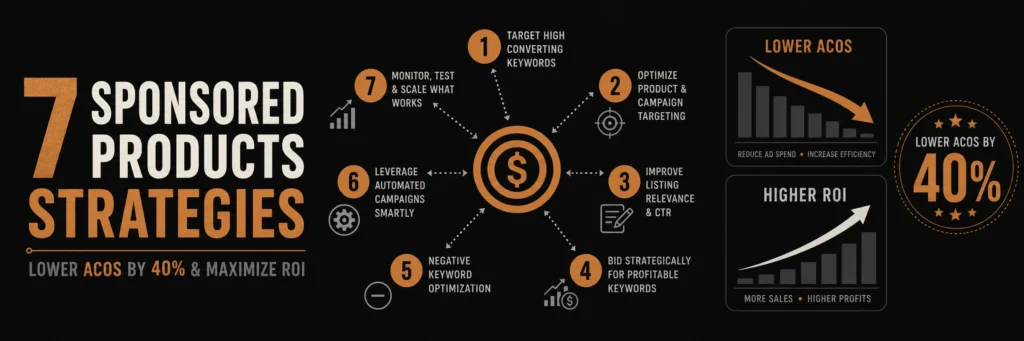
These 7 Sponsored Products strategies are specifically designed to reduce wasted ad spend and bring ACoS down by up to 40 percent without cutting visibility.
!Amazon Sponsored Products optimization dashboard showing campaign performance metrics
What Are Amazon Sponsored Products?
Amazon Sponsored Products are pay-per-click (PPC) ads that appear in Amazon search results and on product detail pages. These Amazon Sponsored Products ads help sellers increase visibility and drive sales through targeted advertising. When customers click your Amazon Sponsored Products ad, you pay a bid amount, making optimization crucial for profitability.
Why Sponsored Products Matter
- Increased Visibility: Products appear in top search results
- Higher Conversion Rates: Targeted ads convert better than organic listings
- Scalable Growth: Increase sales without waiting for organic rankings
- Data Insights: Learn which keywords drive sales
Table of Contents
- What Are Amazon Sponsored Products?
- Strategy 1: Start with Automatic Campaigns
- Strategy 2: Use Exact Match for High-Intent Keywords
- Strategy 3: Implement Negative Keywords
- Strategy 4: Optimize Bids Based on Time
- Strategy 5: Create Product-Specific Ad Groups
- Strategy 6: Leverage Product Targeting
- Strategy 7: Continuously Test and Optimize
Strategy 1: Start with Automatic Campaigns for Keyword Discovery
Automatic campaigns are your secret weapon for finding profitable keywords. Amazon’s algorithm automatically matches your products to relevant searches, revealing opportunities you might miss.
How Automatic Campaigns Work
Amazon uses three targeting methods:
- Close Match: Exact or close variations of your product
- Loose Match: Related searches and synonyms
- Substitutes: Alternative products customers consider
- Complements: Products bought together
Best Practices
- Run for 2-4 Weeks: Collect enough data (at least 1,000 impressions)
- Monitor Search Terms: Export search term reports weekly
- Extract Winners: Move high-performing keywords to manual campaigns
- Add Negatives: Block irrelevant terms immediately
Real Example
A seller running automatic campaigns discovered “wireless earbuds for gym” was converting at 8% with $0.45 CPC. They moved this to a manual campaign and scaled it to $5,000 monthly sales.
Strategy 2: Use Exact Match for High-Intent Keywords
Exact match targeting in Amazon Sponsored Products gives you complete control over when your ads appear. Use it for Amazon Sponsored Products keywords with proven conversion history.
When to Use Exact Match
- High-Converting Keywords: Terms that already convert well
- Branded Searches: Your brand name and product names
- Specific Products: Exact product model numbers
- Competitor Names: When customers search competitor brands
Exact Match Best Practices
- Start with High Bids: Bid 20-30% above suggested bid
- Monitor Closely: Check performance daily for first week
- Scale Winners: Increase budget on profitable keywords
- Pause Losers: Stop spending on keywords with 0 sales after 7 days
Strategy 3: Implement Negative Keywords Strategically
Negative keywords prevent wasted ad spend in Amazon Sponsored Products campaigns. This is one of the most overlooked Amazon Sponsored Products optimization strategies.
Finding Negative Keywords
- Search Term Reports: Export weekly and analyze
- High Spend, Zero Sales: These are your negative candidates
- Irrelevant Terms: Block terms that don’t match your product
- Competitor Brands: If you don’t sell competitor products
Negative Keyword Examples
For premium headphones ($200+):
- “cheap headphones”
- “budget headphones”
- “under $50”
- “free shipping headphones”
Implementation
Add negatives at both campaign and ad group levels:
- Campaign Level: Block terms irrelevant to entire campaign
- Ad Group Level: Block terms specific to product type
Strategy 4: Optimize Bids Based on Time of Day and Day of Week
Bid adjustments in Amazon Sponsored Products can significantly improve efficiency. Amazon allows bid modifiers for different times and days in your Amazon Sponsored Products campaigns.
Time-Based Optimization
Analyze your conversion data to identify peak performance times:
- Morning Hours: Often higher conversion for B2B products
- Evening Hours: Better for consumer products
- Weekends: May have different patterns than weekdays
How to Implement
- Export Performance Data: Get hourly and daily reports
- Identify Patterns: Find when conversions are highest
- Adjust Bids: Increase bids 20-30% during peak times
- Decrease Off-Peak: Lower bids 10-20% during slow periods
Example Bid Schedule
- Monday-Friday, 6 PM – 10 PM: +25% bid adjustment
- Saturday-Sunday, 10 AM – 2 PM: +20% bid adjustment
- Weekdays, 2 AM – 6 AM: -15% bid adjustment
Strategy 5: Create Product-Specific Ad Groups
Grouping similar products in dedicated Amazon Sponsored Products ad groups improves relevance and conversion rates for your Amazon Sponsored Products campaigns.
Ad Group Structure
Create separate ad groups for:
- Product Categories: Different product types
- Price Ranges: Budget vs. premium products
- Use Cases: Different customer needs
- Brands: If selling multiple brands
Benefits
- Better Relevance: Ads match customer intent more closely
- Easier Management: Optimize each group independently
- Improved Quality Score: Higher relevance = lower CPC
- Better Data: Clearer performance insights
Strategy 6: Leverage Product Targeting for Competitor Conquest
Amazon Sponsored Products product targeting lets you show ads on competitor product pages, capturing customers ready to buy. This advanced Amazon Sponsored Products feature helps you compete effectively.
Product Targeting Strategies
- Competitor Products: Target top-selling competitor listings
- Complementary Products: Products bought together
- Substitute Products: Alternative solutions
- Your Own Products: Cross-sell related items
Best Practices
- Target High-Review Products: Products with 100+ reviews
- Monitor Performance: Track which competitor pages convert
- Adjust Bids: Higher bids for high-converting pages
- Add Negatives: Block pages that don’t convert
Strategy 7: Continuously Test and Optimize
Amazon Sponsored Products optimization is ongoing. Regular testing and adjustments are essential for maintaining low ACoS in your Amazon Sponsored Products campaigns.
Weekly Optimization Checklist
Monthly Deep Dive
Common Amazon Sponsored Products Mistakes
Mistake 1: Setting and Forgetting
Many sellers create campaigns and never optimize them. Regular monitoring and adjustments are crucial for success.
Solution: Schedule weekly optimization sessions. Set calendar reminders to review performance.
Mistake 2: Ignoring Search Term Reports
Search term reports reveal what customers actually search for. Ignoring them means missing optimization opportunities.
Solution: Export search term reports weekly. Analyze and take action on findings.
Mistake 3: Bidding Too Low
Low bids mean your ads rarely show, limiting data collection and sales opportunities.
Solution: Start with suggested bids, then adjust based on performance. Don’t be afraid to bid higher for proven keywords.
Mistake 4: Not Using Negative Keywords
Without negative keywords, you’ll waste budget on irrelevant clicks that never convert.
Solution: Build negative keyword lists from search term reports. Add them proactively based on product knowledge.
Measuring Success: Key Metrics
Primary Metrics
- ACoS (Advertising Cost of Sale): Target 15-25% for most products
- ROAS (Return on Ad Spend): Aim for 4:1 or higher
- Conversion Rate: Track and improve over time
- Click-Through Rate (CTR): Higher CTR = better ad relevance
Secondary Metrics
- Impressions: Ensure adequate visibility
- Clicks: Monitor click volume trends
- Spend: Track daily and monthly budgets
- Sales: Total revenue from ads
Tools for Amazon Sponsored Products Management
Amazon Native Tools
- Campaign Manager: Built-in campaign management
- Search Term Reports: Keyword discovery
- Performance Reports: Detailed analytics
- Bid+: Automatic bid increases for top placements
Third-Party Tools
- Helium 10: Keyword research and campaign management
- Jungle Scout: Market research and optimization
- Sellics: Comprehensive PPC management
- PPC Entourage: Advanced campaign optimization
Advanced Tips for Lower ACoS
Tip 1: Use Broad Match for Discovery
Broad match helps find new keyword opportunities. Use it alongside exact and phrase match for comprehensive coverage.
Tip 2: Implement Dayparting
Adjust bids based on time of day when your customers are most active. This can reduce wasted spend during low-conversion periods.
Tip 3: Leverage Seasonal Trends
Increase bids and budgets during peak seasons (holidays, Prime Day, etc.) when conversion rates are typically higher.
Tip 4: A/B Test Ad Copy
Test different product images and titles in your listings to see which combinations drive better ad performance.
Real Success Story
A seller implementing these 7 strategies reduced their ACoS from 45% to 27% in 8 weeks while increasing ad sales by 60%. Key changes included:
- Systematic negative keyword management
- Time-based bid adjustments
- Product targeting on competitor pages
- Weekly optimization routine
Conclusion
Amazon Sponsored Products success requires strategy, not just spending. By implementing these 7 proven Amazon Sponsored Products strategies—starting with automatic campaigns, using exact match effectively, managing negative keywords, optimizing bids, creating proper ad groups, leveraging product targeting, and continuous testing—you can significantly reduce ACoS while scaling sales.
Remember, Amazon Sponsored Products optimization is an ongoing process. What works today may need adjustment tomorrow. Stay active, monitor your Amazon Sponsored Products performance, and continuously refine your approach to maximize ROI from your Amazon Sponsored Products campaigns.
Ready to optimize your Amazon Sponsored Products campaigns? Contact advertpreneur for expert Amazon PPC management services. We help sellers reduce ACoS, improve ROI, and scale profitable advertising campaigns.