amazon Rufus AI listing optimization
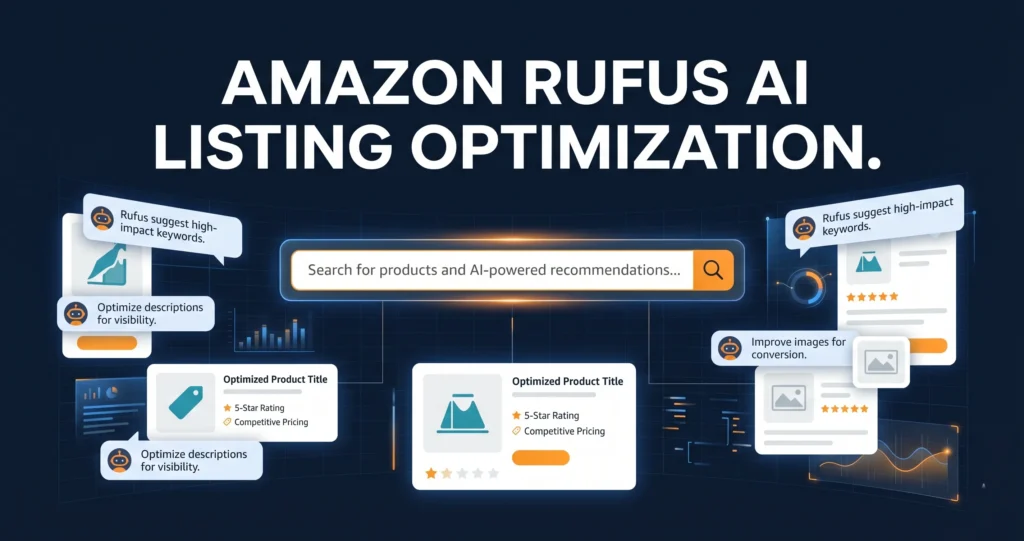
Amazon Rufus AI listing optimization is no longer optional for sellers who want to compete. Rufus, Amazon’s AI shopping assistant, now handles over 274 million queries every day, and it decides which products buyers see first.
Table of Contents
- What Is Amazon Rufus and Why Does It Matter?
- How Rufus Reads your Product Listings
- Amazon Rufus AI Listing Optimization: Step-by-Step
- Intent-Based Keyword Targeting for Rufus
- The Amazon A10 Algorithm and Rufus in 2026
- Standard SEO vs Rufus Optimisation: Key Differences
- Common Mistakes Sellers Make with Rufus
- Frequently Asked Questions
- Conclusion
What Is Amazon Rufus and Why Does It Matter?
Rufus is Amazon’s built-in AI shopping assistant. It answers shopper questions directly inside the Amazon app and search results.
Firstly, Rufus does not just match keywords. Instead, it reads your entire listing to understand what your product does and who it suits.
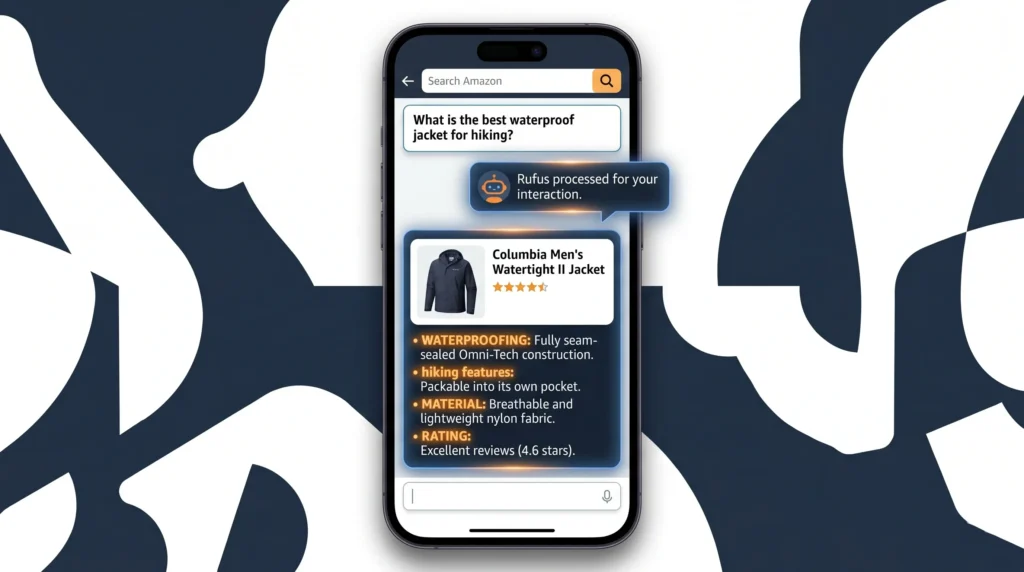
For example, a shopper might type: “What’s the quietest blender for a small apartment?” Rufus then scans listings and picks the products whose content best answers that question.
So, if your listing doesn’t answer real buyer questions, Rufus skips it. As a result, your competitor gets the sale.
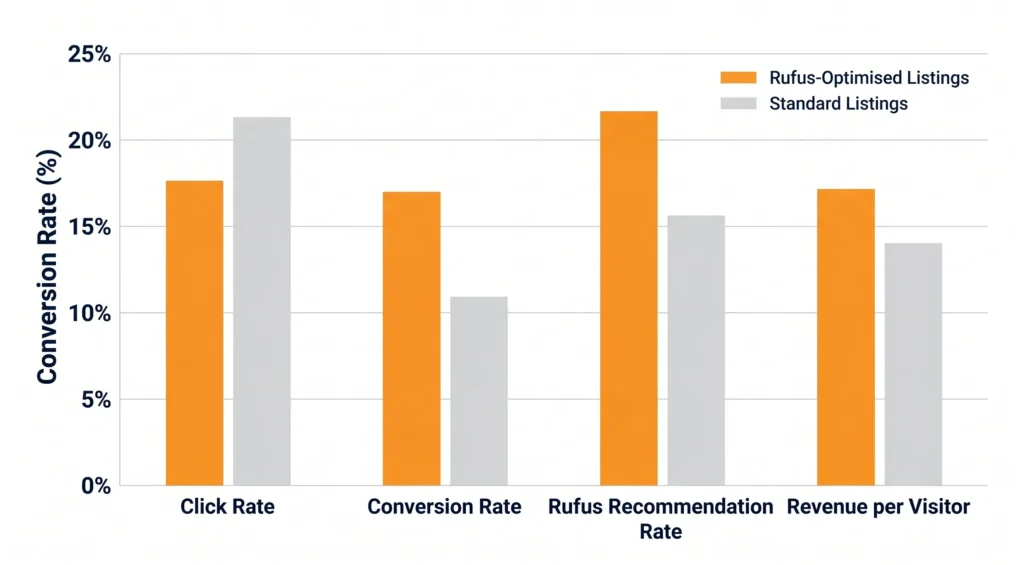
In fact, Rufus users convert at a 60% higher rate than shoppers who don’t use Rufus. That means Amazon Rufus AI listing optimization directly affects your revenue, not just your rankings.
Pro Tip: Go to your product page on Amazon. Scroll down and look at the questions Rufus prompts buyers to ask. Use those exact questions to guide your bullet points and A+ Content copy.
How Rufus Reads Your Product Listings
Rufus doesn’t just read your title and bullets. It also scans your Q&A section, your A+ Content, your reviews, and your Brand Story module.
Specifically, Rufus looks for three things in every listing. First, it wants clear answers to buyer questions. Second, it needs specific product details with real numbers and features. Third, it checks whether your content matches the shopper’s actual intent.
For instance, a listing that says “waterproof material” performs worse than one that says “IPX7 waterproof, tested at 30 metres for 30 minutes.” Rufus prefers specific facts.
Additionally, Rufus reads your Q&A section more than Most Sellers realise. A listing that went from 4 Q&A entries to 18 specific answers saw a 9% lift in conversion rate, according to research from Ecom Clips. That’s a significant gain from one section alone.
Therefore, your goal is to make every section of your listing a self-contained answer to a specific buyer question. Think of each bullet point as a reply to a Rufus query.
What Rufus Ignores
Rufus deprioritises keyword-stuffed copy that doesn’t read naturally. It also ignores thin Q&A sections with vague answers like “Please refer to the product description.”
Similarly, Rufus skips A+ Content that’s mostly decorative. Content must contain real, specific information to be useful to the AI.
Amazon Rufus AI Listing Optimization: Step-by-Step
Amazon Rufus AI listing optimization follows a clear process. You can start applying it today, even if your listings are already live.
Step 1: Pull the Rufus Questions From Your Listing
Open your live product page on Amazon. Rufus displays suggested questions near the product images. Write them all down.
Next, check if your listing actually answers those questions. Most listings don’t, and that’s the gap you need to close.
Step 2: Rewrite Your Bullets as Question Answers
Each bullet should open with a benefit, then answer a common buyer question with a specific detail. For example: “100% Waterproof: Survives rain, sweat, and spills so you never miss a workout.”
Also, avoid repeating the same phrase in every bullet. Rufus reads all five bullets together, so vary your language and cover different use cases.
Step 3: Build Out Your Q&A Section
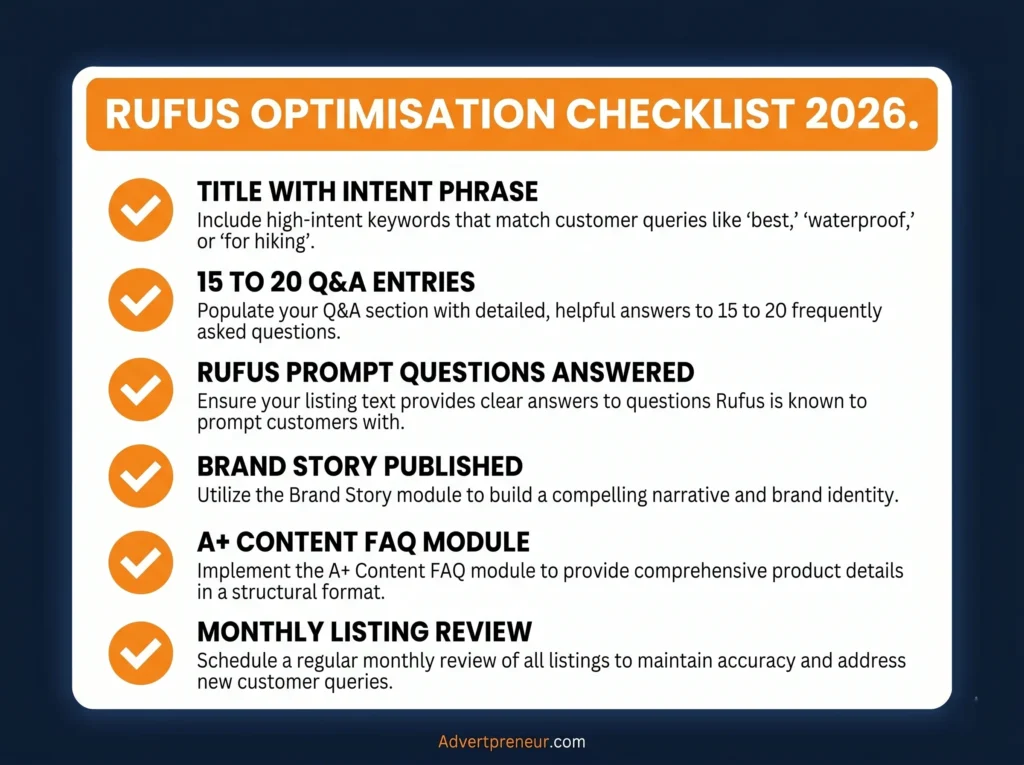
Aim for at least 15 to 20 detailed Q&A entries per listing. Write natural, conversational answers that use the words real buyers use.
For instance, if buyers ask “Is this safe for children?”, don’t answer “Yes.” Instead, write: “Yes, this product meets ASTM F963 safety standards and contains no BPA. It’s safe for children aged 3 and above.”
Step 4: Add a Specific, Story-Driven Brand Story Module
Your Brand Story is not just a brand registry checkbox. Rufus reads it. Use it to explain who your product is for and what problem it solves.
In addition, your Brand Story unlocks access to Premium A+ Content. Premium A+ boosts conversion rates by up to 20% compared to plain text, according to Amazon’s own data.
Step 5: Optimise Your A+ Content for Rufus
Include comparison tables, FAQ modules, and use-case infographics. Rufus pulls structured content from A+ much more readily than it pulls from plain description text.
Most importantly, don’t treat A+ Content as decoration. Every module should answer a buyer question or remove a purchase objection.
- Use the FAQ module to pre-answer the top 5 objections from your reviews.
- Use the comparison table to show how your product beats alternatives on the metrics buyers care about.
- Use image alt text with natural language descriptions, not keyword strings.
- Use the “Regimen” or carousel module to show real-world use cases.
- Add video to Premium A+ if available. Rufus uses video metadata to understand product context.
Warning: Unanswered Q&A questions are a direct signal to Rufus that your listing is incomplete. Every unanswered question is a reason Rufus will surface a competitor instead.
Intent-Based Keyword Targeting for Rufus
Intent-based keyword targeting is the single biggest shift sellers need to make for Amazon AI search ranking in 2026. Old-school Keyword Research finds what people type. Intent-based research finds what people mean.
For example, the old approach targets “waterproof hiking boots men size 10.” The Rufus-era approach targets “best waterproof boots for hiking in wet Scottish weather.” These are very different phrases, and Rufus rewards the second style.
To build your intent keyword list, start by reading your one-star and three-star reviews. Buyers spell out exactly what they wanted but didn’t get. Those phrases are your highest-value intent keywords.
Secondly, use the autocomplete bar in Amazon search to find question-style keywords. Search “hiking boots for” and record every suggestion. Each one is a real buyer intent signal.
Thirdly, check the “Customers also ask” section in Google for your product category. Those questions map directly to what Rufus answers inside Amazon.
- Target phrases that start with “best”, “for”, “that works with”, “safe for”, and “under $X”.
- Include size, weight, age range, and material details in your copy, not just in the title.
- Write at least one bullet that addresses a common misuse or wrong-fit scenario to build trust.
- Use your backend search terms to index for spelling variations and synonym phrases.
Our SEO team at Advertpreneur builds full intent keyword maps for clients across every category. You can get a free strategy review to see where your listing is missing key intent signals.
The Amazon A10 Algorithm and Rufus in 2026
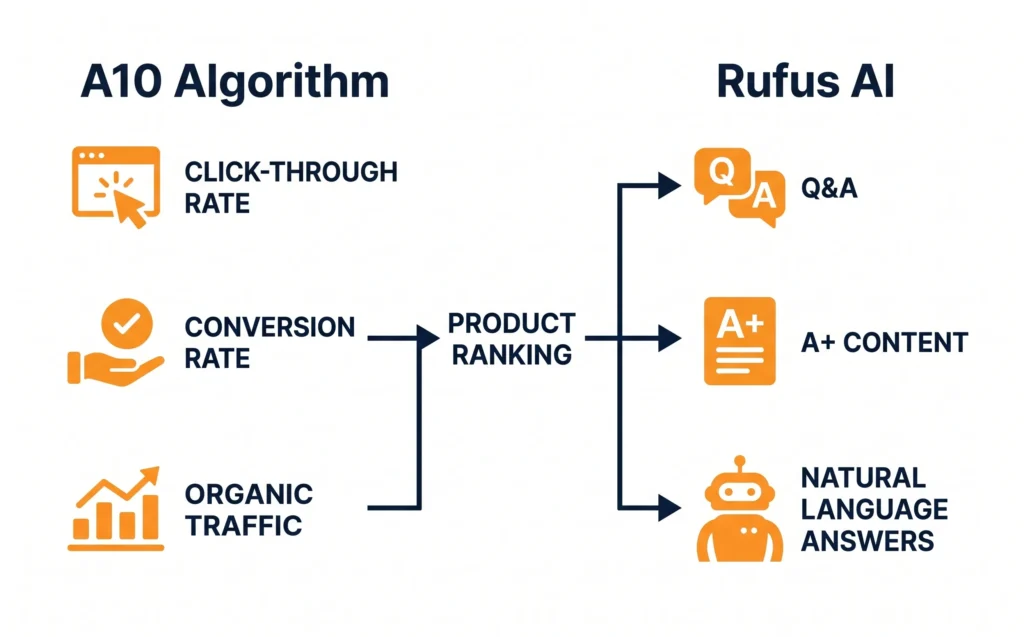
The Amazon A10 algorithm and Rufus now work together as a two-layer system. A10 decides your organic search rank. Rufus decides whether you get recommended in AI-driven answers.
Specifically, A10 still rewards click-through rate, conversion rate, and off-Amazon traffic. But Rufus adds a new layer: it rewards content depth, answer quality, and natural language relevance.
So, you need to satisfy both. A thin listing might rank well organically but still get skipped by Rufus. Conversely, a rich listing with poor keyword coverage won’t appear in either system.
For Amazon Listing Optimization 2026, the winning formula combines A10 keyword discipline with Rufus-ready conversational content. You can’t choose one over the other.
In addition, A10 now places significant weight on off-Amazon traffic. Driving buyers from TikTok, Pinterest, or email to Your Amazon Listing gives your ranking a genuine boost. Rufus then takes over once the buyer lands on your page.
Also, AI shopping assistant optimization is not a one-time task. Amazon updates Rufus regularly. Sellers who monitor their Rufus question prompts monthly and update their listings accordingly will outpace those who set and forget.
Standard SEO vs Rufus Optimisation: Key Differences
Many sellers try to apply old Amazon SEO rules to a Rufus world. The two approaches differ in almost every important way.
Table: Standard Amazon SEO vs Rufus-Ready Listing Optimisation in 2026
| Factor | Standard Amazon SEO | Rufus Optimisation |
|---|---|---|
| Keyword Style | Short, high-volume exact match | Long-tail, question-style, intent-based |
| Bullet Points | Feature-first with keyword insertion | Answer-first with specific details |
| Q&A Section | Often ignored or left to buyers | Actively managed with 15 to 20 entries |
| A+ Content | Brand storytelling focus | FAQ modules, comparison tables, use cases |
| Backend Keywords | Max keyword stuffing | Synonyms, misspellings, Spanish variants |
| Title Structure | Keyword heavy, front-loaded | Keyword + context + use-case phrase |
| Content Length | As short as possible | As detailed as needed to answer all questions |
| Update Frequency | Quarterly or after rank drop | Monthly, tracking Rufus prompts |
For an expert breakdown of how Amazon’s ranking systems are evolving, read this detailed Amazon listing optimisation guide from Incrementum Digital. It covers the data behind Rufus’s influence on sales.
Common Mistakes Sellers Make with Rufus
Most sellers lose visibility to Rufus not because their products are bad but because their listings don’t give Rufus enough to work with.
Mistake 1: Ignoring the Q&A Section
This is the most common gap. Rufus actively pulls from Q&A to answer shopper queries. An empty or vague Q&A section is a direct competitive disadvantage.
Mistake 2: Keyword-First Bullet Points
Bullets like “PREMIUM QUALITY: Made with the best materials for superior performance” tell Rufus nothing. Rufus can’t use that to answer a real buyer question. Specifics win every time.
Mistake 3: Treating A+ Content as Visual Branding Only
Sellers who use A+ purely for brand aesthetic miss the structured content opportunity. Rufus reads text inside A+ modules. Decorative layouts without real product answers waste the space.
Mistake 4: Not Monitoring Rufus Prompt Changes
Amazon updates the suggested Rufus questions on your product page regularly. Sellers who check these monthly and update their content accordingly stay ahead. Those who don’t slowly lose Rufus recommendations to faster-moving competitors.
For a deep dive into Q&A optimisation and how it affects AI recommendations, see this Amazon Q&A optimisation guide from Ecom Clips. It’s one of the best practical resources available right now.
- Don’t copy competitor listings. Rufus sees duplicate content patterns across the catalogue.
- Don’t use generic phrases like “high quality” or “great value.” Rufus can’t use them to answer specific buyer questions.
- Don’t skip your Brand Story module. It’s required for Premium A+ access and Rufus reads it.
- Don’t neglect negative reviews. Mine them for the objections your listing currently fails to address.
Frequently Asked Questions
What is Amazon Rufus and how does it affect my listings?
Rufus is Amazon’s AI shopping assistant. It answers buyer questions by scanning product listings, Q&A sections, reviews, and A+ Content. If your listing doesn’t answer real buyer questions with specific details, Rufus recommends your competitors instead. Amazon Rufus AI listing optimization means structuring your content so Rufus can extract clear, useful answers from every section of your listing. Does Rufus affect my organic Amazon search ranking?
Rufus and the Amazon A10 algorithm work as two separate systems. A10 controls your organic search rank based on keywords, conversion rate, and click-through rate. Rufus controls whether your product gets recommended in AI-generated answers. You need to satisfy both. A Rufus-optimised listing with good A10 keyword coverage will outperform listings that focus on only one of the two systems. How many Q&A entries do I need for Rufus to recommend my product?
There’s no fixed minimum, but the data points to at least 15 to 20 detailed Q&A entries per listing. Each answer must be specific and use natural language. A listing that expanded from 4 to 18 Q&A entries saw a 9% conversion rate lift according to industry research. Thin, vague answers don’t help. Write Q&A entries the way you’d answer a customer on a phone call. What is intent-based keyword targeting and how is it different from standard keyword research?
Standard keyword research finds words people type into Amazon search. Intent-based keyword targeting finds what buyers actually mean and want. For example, “men’s running shoes size 10” is a keyword. “Best running shoes for flat feet that don’t cause knee pain” is an intent phrase. Rufus understands intent phrases and rewards listings that answer them directly. You build your intent keyword list from reviews, Rufus prompt questions, and Google’s People Also Ask box. Is Premium A+ Content worth it for smaller sellers in 2026?
Yes, if you qualify. Premium A+ Content Boosts Conversion Rates by up to 20% compared to plain text, according to Amazon’s own data. To unlock it, you need a published Brand Story across all your ASINs and at least five approved A+ Content projects in the past 12 months. Rufus also reads Premium A+ modules, especially FAQ and comparison table modules. For any hero ASIN, Premium A+ is one of the highest-return investments you can make. How often should I update my listing for Rufus optimisation?
Check your Rufus prompt questions monthly. Amazon updates these regularly based on shifting buyer behaviour. When the questions change, update your bullets, Q&A, and A+ Content to match. Also revisit your listing after every product review batch. New negative reviews often reveal gaps that Rufus is currently unable to answer from your content.
Ready to grow your Amazon business?
Get a free strategy call with Advertpreneur.Book Your Free Consultation
Conclusion
Amazon Rufus AI listing optimization is the most important shift in Amazon selling since the A9 algorithm first launched. Rufus now controls a significant share of buyer discovery, and sellers who ignore it will lose ground fast in 2026.
To summarise, you need to treat every section of your listing as a structured answer to a real buyer question. Rewrite your bullets with specific details. Build out your Q&A section. Use A+ Content modules that answer objections. Apply intent-based keyword targeting across all your copy. And check your Rufus prompt questions every month to stay current.
Finally, the sellers winning on Amazon in 2026 are the ones who think like their buyers, not like search bots. Rufus rewards content that genuinely helps people make good decisions. Start with your highest-revenue ASIN, apply this framework, and then work through the rest of your catalogue. The results will compound.
Amazon Brand Registry: Complete Guide to Protecting Your Brand on Amazon
Amazon Brand Registry is a program designed to help brand owners protect their intellectual property and enhance their presence on Amazon. This comprehensive guide covers everything you need to know about enrolling in Brand Registry, its benefits, and how to maximize its value for your business.
What is Amazon Brand Registry?
Definition
Amazon Brand Registry is a program that gives brand owners more control over their product listings, helps protect intellectual property, and provides access to powerful brand-building tools on Amazon.
Purpose
- Brand Protection: Prevent unauthorized sellers and counterfeit products
- Listing Control: Manage how your products appear on Amazon
- Enhanced Tools: Access to A+ Content, Stores, and other brand features
- Intellectual Property: Report and remove infringing content
Benefits of Amazon Brand Registry
1. Brand Protection
- Report Violations: Report intellectual property violations
- Remove Counterfeits: Request removal of counterfeit listings
- Control Listings: Prevent unauthorized changes to your listings
- Trademark Protection: Enhanced protection for registered trademarks
2. Enhanced Brand Content
- A+ Content: Create rich product descriptions with images and text
- Brand Stores: Build dedicated brand storefronts
- Enhanced Images: Upload more product images
- Video Content: Add videos to product listings
3. Better Search and Discovery
- Brand Analytics: Access to search and performance data
- Sponsored Brands: Create brand-focused advertising campaigns
- Brand Dashboard: Centralized brand management
- Improved Rankings: Better control over product information
4. Listing Control
- Listing Authority: Control who can edit your listings
- Product Information: Manage product details and specifications
- Image Control: Control product images and media
- Content Management: Manage all brand-related content
Amazon Brand Registry Requirements
Eligibility Requirements
1. Trademark Registration
- Registered Trademark: Must have an active registered trademark
- Trademark Office: Must be registered with eligible trademark office
- Trademark Type: Text-based or image-based trademarks accepted
- Status: Trademark must be in “Registered” status (not pending)
2. Eligible Trademark Offices
- United States Patent and Trademark Office (USPTO)
- European Union Intellectual Property Office (EUIPO)
- United Kingdom Intellectual Property Office (UKIPO)
- Canadian Intellectual Property Office (CIPO)
- And other eligible offices (check Amazon for current list)
3. Account Requirements
- Seller Account: Must have active Amazon seller account
- Account Health: Good account standing required
- Product Listings: Must have products listed under your brand
- Brand Ownership: Must own or have authorization to represent the brand
What You’ll Need
- Trademark Registration Number: From trademark office
- Brand Name: Exact brand name as registered
- Product Images: Images showing your brand on products
- Website: Brand website (optional but recommended)
- Product Listings: Existing listings with your brand
How to Enroll in Amazon Brand Registry
Step 1: Prepare Your Trademark
- Ensure trademark is registered (not pending)
- Have trademark registration number ready
- Verify trademark office is eligible
- Confirm brand name matches trademark exactly
Step 2: Gather Required Information
- Trademark Details: Registration number, office, registration date
- Brand Information: Brand name, logo, website
- Product Images: Images showing brand on products
- Account Information: Seller Central account details
Step 3: Start Enrollment
- Log into Amazon Seller Central
- Navigate to Brand Registry section
- Click Enroll a Brand
- Enter brand name and select country
Step 4: Provide Trademark Information
- Enter trademark registration number
- Select trademark office
- Upload trademark certificate or registration document
- Verify trademark details
Step 5: Provide Brand Information
- Upload brand logo
- Provide brand website (if available)
- Upload product images showing brand
- Describe your brand and products
Step 6: Verify Identity
- Amazon will send verification code
- Code sent to trademark contact or brand owner
- Enter verification code to complete enrollment
- Wait for Amazon approval (typically 1-2 weeks)
Amazon Brand Registry Features
1. Brand Protection Tools
- Report a Violation: Report IP violations and counterfeits
- Project Zero: Automated protection for eligible brands
- Transparency: Product serialization program
- IP Accelerator: Faster trademark registration support
2. Enhanced Content Tools
- A+ Content: Rich product descriptions with images
- Brand Stores: Dedicated brand storefronts
- Enhanced Brand Content: Enhanced product listings
- Video Content: Add videos to product pages
3. Analytics and Insights
- Brand Analytics: Search and performance data
- Demographics: Customer demographic insights
- Search Terms: Popular search terms for your brand
- Competitive Analysis: Compare with competitors
4. Advertising Tools
- Sponsored Brands: Brand-focused advertising
- Stores: Promote brand storefronts
- Display Ads: Brand display advertising
- Video Ads: Brand video advertising
Brand Registry vs. Brand Registry 2.0
Original Brand Registry
- Basic brand protection
- Limited tools and features
- Manual reporting process
- Fewer analytics
Brand Registry 2.0 (Current)
- Enhanced protection tools
- More automation
- Better analytics
- Advanced features
- Project Zero eligibility
Project Zero
What is Project Zero?
Project Zero is an invite-only program that gives brands automated tools to remove counterfeit listings. It’s available to Brand Registry members who meet additional requirements.
Benefits
- Automated Protection: Self-service counterfeit removal
- Product Serialization: Track individual products
- Faster Removal: Counterfeits removed within hours
- Better Control: More control over brand protection
Requirements
- Active Brand Registry enrollment
- Proven track record of reporting violations
- High-volume brand with counterfeiting issues
- Invitation from Amazon
Brand Registry Best Practices
1. Complete Your Brand Profile
- Upload high-quality brand logo
- Provide complete brand information
- Add brand website and social media
- Keep information updated
2. Use Enhanced Content
- Create A+ Content for all products
- Build a Brand Store
- Add videos and enhanced images
- Regularly update content
3. Monitor Your Brand
- Regularly check for unauthorized sellers
- Monitor product listings for changes
- Review customer feedback and reviews
- Track brand performance metrics
4. Protect Your Intellectual Property
- Report violations promptly
- Document trademark ownership
- Monitor for counterfeits
- Use Project Zero if eligible
Common Brand Registry Mistakes
Mistake 1: Incomplete Enrollment
- Missing required information
- Incorrect trademark details
- Poor quality images
- Solution: Double-check all information before submitting
Mistake 2: Not Using Enhanced Features
- Not creating A+ Content
- Not building Brand Store
- Missing out on analytics
- Solution: Take advantage of all available features
Mistake 3: Poor Brand Protection
- Not monitoring for violations
- Slow response to counterfeits
- Incomplete reporting
- Solution: Actively protect your brand
Mistake 4: Inactive Account
- Not logging in regularly
- Not updating information
- Missing feature updates
- Solution: Stay active and engaged
Brand Registry for Different Business Types
Small Businesses
- Benefits: Brand protection and enhanced content
- Focus: Complete enrollment and use basic features
- Strategy: Build brand presence gradually
- Investment: Time and effort, minimal cost
Medium Businesses
- Benefits: Full feature access and analytics
- Focus: A+ Content, Stores, and advertising
- Strategy: Maximize brand presence and protection
- Investment: Content creation and management
Large Businesses
- Benefits: Project Zero, advanced analytics
- Focus: Comprehensive brand protection and optimization
- Strategy: Full feature utilization and automation
- Investment: Dedicated resources and tools
Brand Registry Costs
Enrollment Cost
- Free: Brand Registry enrollment is free
- Trademark Cost: Must have registered trademark (varies by country)
- No Monthly Fees: No ongoing subscription fees
Additional Costs
- A+ Content: Free (but may need design resources)
- Brand Stores: Free to create
- Advertising: Pay-per-click for Sponsored Brands
- Professional Services: If hiring help for enrollment or content
Maintaining Brand Registry
Ongoing Requirements
- Active Account: Maintain active seller account
- Trademark Status: Keep trademark registration active
- Compliance: Follow Amazon policies
- Updates: Keep brand information current
Renewal
- Automatic: Brand Registry doesn’t require manual renewal
- Trademark Renewal: Must renew trademark with trademark office
- Account Health: Maintain good account standing
- Compliance: Continue following Amazon policies
Common Questions About Brand Registry
Do I need a trademark to enroll?
Yes, you need an active registered trademark (not pending) from an eligible trademark office.
How long does enrollment take?
Typically 1-2 weeks after submitting complete information and verification.
Is Brand Registry free?
Yes, enrollment is free, but you must have a registered trademark (which has costs).
Can I enroll multiple brands?
Yes, you can enroll multiple brands if you own multiple trademarks.
What if my trademark is pending?
You must wait until your trademark is registered (not pending) before enrolling.
Conclusion
Amazon Brand Registry is essential for brand owners selling on Amazon. It provides brand protection, enhanced content tools, and valuable analytics that can significantly improve your Amazon presence and sales.
If you own a registered trademark, enrolling in Brand Registry should be a priority. The benefits—from brand protection to enhanced content capabilities—far outweigh the effort required for enrollment.
Need help with Amazon Brand Registry? Contact advertpreneur for expert Amazon brand management services. We help brands enroll in Brand Registry and maximize its benefits.
Related Resources
- → Amazon PPC Basics: Simple Guide for Beginners
- → 7 Amazon Sponsored Products Strategies That Lower ACoS by 40%
- → Amazon Listing Optimization: 15 Ways to Improve Your Product Listings
- → Complete Guide to Amazon SEO: How to Rank Your Products on Page 1 in 2025
- → Amazon A+ Content: How to Create Conversion-Optimized Enhanced Brand Content
- → Amazon Keyword Research: The Ultimate Guide to Finding Profitable Keywords